Hello everyone! I'm Yuki Kitou, a guitar instructor.
This time, I want to recommend some apps and items that I use regularly and find extremely convenient for lessons and practice. For the first part, I’ll be introducing a music notation software.
Let's take a look right away!
Essential Item #1: Music Notation Software
There are so many music notation software options out there, such as Guitar Pro, Sibelius, Finale, and so on. Of course, if you’re dealing with orchestras or brass bands with multiple parts, you’re probably better off using a paid, specialized software.
But the software I’m going to introduce today is a great free option: MuseScore.
To be honest, if you're working with guitar, bass, or ukulele, MuseScore is more than capable of meeting your needs. In the early days, I used to write my sheet music by hand, but that was incredibly inefficient, and it’s much easier to do it on a PC where everything can be done at once.
While writing on paper might be faster in terms of speed, if you lose the original or make it messy, the copies will look bad, and it’s not easy to make corrections on the spot.
With music notation software like MuseScore, you can fix your mistakes immediately, print out the new version, or send clean sheet music to your students via LINE. This makes the lesson experience more considerate for the person taking the lesson, I believe.
■ The Good Things About MuseScore #1: Simple UI
One of the most attractive features of MuseScore is its "easy-to-use" UI, which many people mention.
With plenty of shortcut keys available, you can instantly change rhythms, from quarter notes to dotted eighth notes, sixteenth notes, and more.
While I wouldn’t say it’s possible to write sheet music instantly the moment you install it, the shortcuts are incredibly useful. If you’re thinking about starting to use MuseScore, I’d recommend researching the shortcuts first, as it can make your experience much more comfortable.
That said, compared to pro-level software like Sibelius, the learning curve for MuseScore is much more approachable for beginners. I personally struggled a lot during the first month, thinking “I can’t do this at all!” However, the official MuseScore website has an enormous amount of Q&A and community forums where users help each other out, so I was able to solve most of my problems there.
Additionally, there are YouTube channels that introduce the basics of MuseScore in Japanese, and after watching a few videos over the course of a few months, I reached a point where I thought, “Oh, this is faster than writing it out by hand!”
■ The Good Points About MuseScore #2: Variety of Sheet Music You Can Create
Another great thing is the wide variety of sheet music you can create. MuseScore lets you create sheet music for not only guitar, but also for brass, strings, ukulele, and anything else, whether it's standard notation or tablature. It’s very convenient!
For example, you can easily create chord charts like this:
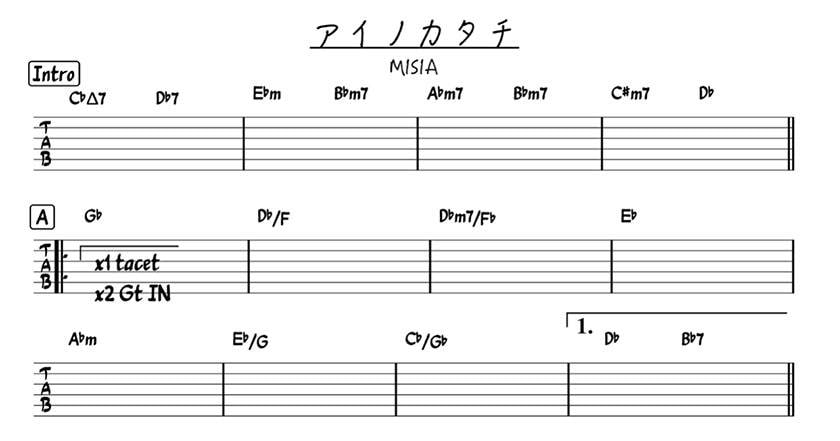
Having MuseScore allows you to create clean, professional-looking sheet music for your band or recordings, and it’s especially useful when you need to distribute chord charts to band members. It really comes in handy in those situations!
■ The Good Things About MuseScore #3: It Makes You a Better Guitarist
Finally, this is the reason I highly recommend music composition software (especially for beginner guitar teachers). I think many guitar teachers who come from a band background might struggle with reading traditional sheet music, don’t you agree?
Personally, I’m not good at it. But if you can’t read sheet music, lessons can get stalled and you might inconvenience your students.
However, if you're not familiar with classical guitar or don't often have the chance to read sheet music, try transcribing a guitar solo from any genre – J-pop, rock, anything.
Transcribing music can give you a lot of insights into your playing. You might realize that parts you thought were correct actually have slight rhythm differences or that you become more aware of rests. It’s genuinely beneficial, so I highly encourage you to give it a try!
■ The Good Things About MuseScore #4: It’s Free
This is probably the biggest difference between MuseScore and other music composition software. Unlike the LE versions of DAWs, MuseScore is free, and you can use all the features it offers without any limitations.
There’s no “10 sheet music creations max!” or any kind of push to make you upgrade to a paid version.
So, if you’ve been wanting to try out music composition software but the price has been a barrier, I definitely recommend giving MuseScore a try.
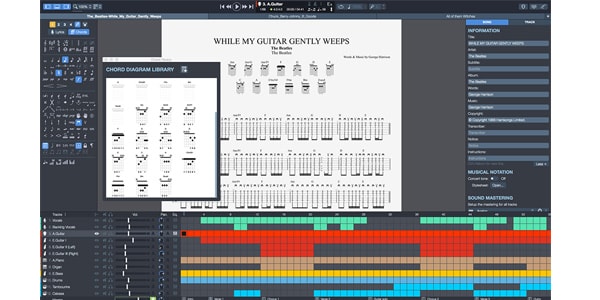
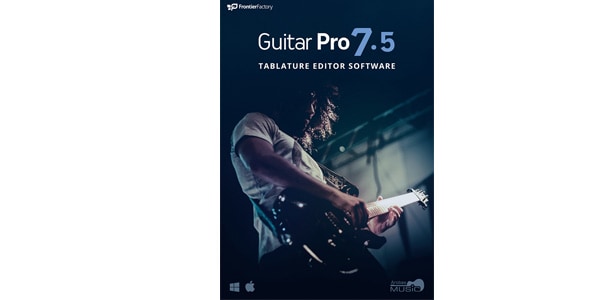
That said, it’s not specifically designed for guitarists. If you're a guitarist, you might also consider using Guitar Pro 7.5.
AROBAS MUSIC / Guitar Pro 7.5 - Tab Editing Software
The “sound & person” column is made up of contributions from you.
For details about contributing, click here.



 ギターケーブルの作り方
 ギターアンプ コンボタイプ編
 ギターのお手入れ
 ギターの選び方
 ギター演奏に必要なものは?
 めちゃラク!ギター講座
 Discount Sale
 Outlet
 New Arrivals
 Podcast (streaming)
 Headphones / Earphones
 Microphones
 Wireless Equipment
 Speakers
 Power Amps
 Mixers
 Processors
 Portable PA Systems
 Recorders
 Karaoke
 Guitars
 Basses
 Ukuleles
 Drums & Percussion
 Pianos / Synthesizers
 Wind Instruments
 Stringed Instruments
 Japanese Instruments
 Harmonicas, Other
 Software
 DJ & VJ
 Stands
 Cables & Connectors
 Racks & Cases
 Lighting
 Stage & Truss
 Video Equipment
 PC PERIPHERALS
 Power Supplies
 Studio Furniture
 Household Items, Other
 Alcoholic Beverages