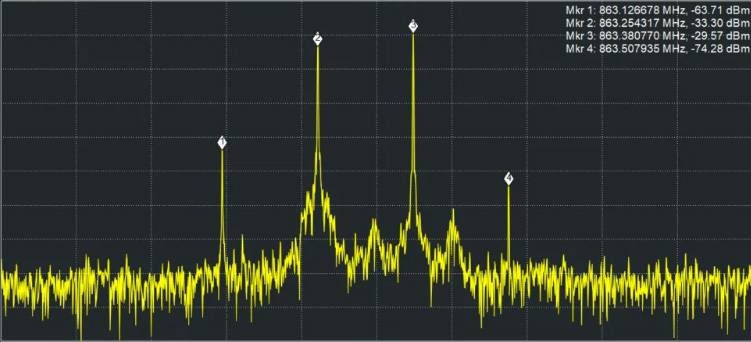
Have you ever wished that radio waves were visible, thinking how much easier wireless operation would be if you could visualize them? The image above shows radio waves visualized using a very expensive piece of equipment called a spectrum analyzer. It would be difficult for the average person to purchase such equipment, wouldn’t it? This time, I would like to explain one of the causes of interference, ‘intermodulation’, in a way that I hope will be useful for actual operation.
When using multiple wireless microphones simultaneously, have you ever encountered problems such as “There’s noise even though I changed the channel,” “The sound suddenly cuts out,” or “The frequencies aren’t overlapping according to the settings, but the system still doesn’t work properly”?
One possible cause is ‘intermodulation’.
It is not a term we hear very often in everyday life, but it is extremely important knowledge for operating wireless microphones safely and reliably. This time, I’ll explain what intermodulation is, why it occurs, and why B-band wireless systems are often accompanied by the instruction, “Please use channels that are at least five channels apart.”
What is Intermodulation?
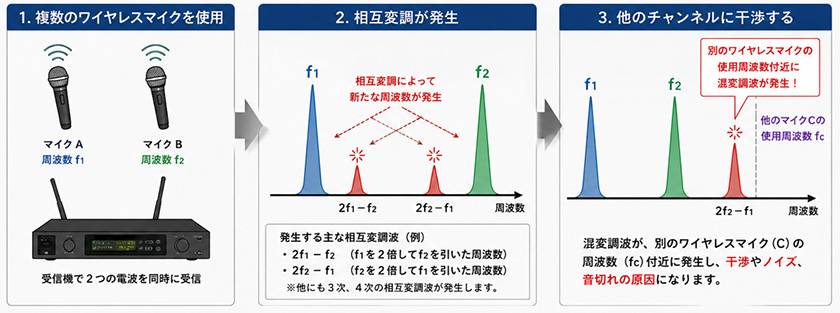
Intermodulation is a phenomenon in which multiple radio waves affect one another, causing new unwanted radio waves (intermodulation products) that did not originally exist to be generated.
For example, suppose you are using two microphones simultaneously:
- Microphone A
- Microphone B
Even if they are each using different frequencies, the signals can interact with one another inside the receiver or transmitter, or strong radio waves can interfere with each other, creating new frequency components from ‘A’s frequency’ and ‘B’s frequency’.
If this unwanted radio wave appears near the operating frequency of another wireless microphone, it can lead to problems such as:
- Noise
- Loud popping sounds
- Audio dropouts
- Sudden muting
- Reduced reception sensitivity
In other words,
the important point is that even when frequencies do not overlap, intermodulation can create an interfering signal at another frequency.
The following diagram gives an idea of what this looks like.
Why Does It Occur When Using Multiple Units?
Wireless microphones are each radio transmitter.
When using only one microphone, there is no problem. However, as the number of units increases—two, three, four, and so on—the number of combinations in which the radio waves can affect one another also increases.
For example:
- With 2 units, there is 1 combination
- With 4 units, there are 6 combinations
- With 8 units, there are 28 combinations
- With 16 units, there are 120 combinations
As the number of units in use increases, the possibility of intermodulation occurring rises rapidly.
For this reason, at live houses, halls, and large-scale events, wireless microphone frequencies are managed using dedicated software and frequency planning.
Why B-Band Wireless Systems Should Be Used “At Least Five Channels Apart”
With B-band wireless microphones, which are widely used in Japan, you may come across the instruction:
“Please use channels that are at least five channels apart.”
This is precisely to avoid intermodulation.
The range of frequencies available in the B band is limited, and the frequency spacing between adjacent channels is very close.
When nearby channels are used simultaneously:
- Intermodulation is more likely to occur
- Adjacent-channel interference is also more likely to occur
- Stable communication becomes more difficult

As a general guideline, many B-band wireless systems recommend using channels that are at least five channels apart.
For example, avoid combinations that are close together, such as:
- CH1 and CH2
- CH10 and CH12
and instead select channels that are sufficiently separated, such as:
- CH1 and CH6
- CH5 and CH10
Doing so can greatly reduce the risk of intermodulation.
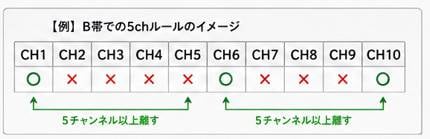
Of course, the recommended combinations differ depending on the manufacturer and model, so during actual operation it is important to check the instruction manual, frequency charts published by the manufacturer, and channel plans.
As the Number of Units Increases, “Just Picking an Available Channel” Is Dangerous
It is not uncommon for people to set a channel simply because they think, “This channel is free, so it should be fine.”
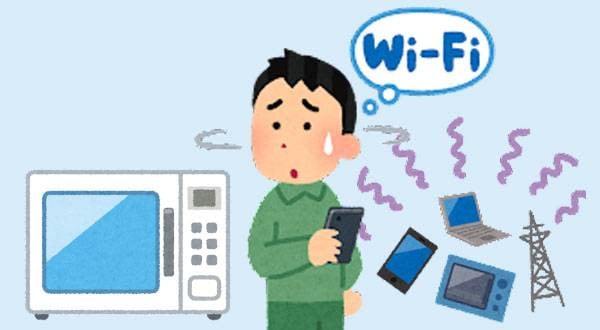
However, there are many devices around us that can potentially cause interference, including:
- Other wireless microphones
- Wireless in-ear monitors
- Mobile phones
- Wireless equipment at other venues
- Large LCD monitors
When intermodulation is added to these factors, it can lead to unexpected problems.
In particular, in environments where multiple wireless devices are used simultaneously, such as:
- School events
- Wedding venues
- Hotels
- Live houses
- Theaters
- Trade shows
careful frequency planning in advance is essential.
Don’t Let Your Guard Down Even with Digital Wireless
In recent years, digital wireless microphones have become mainstream, and their resistance to interference has improved considerably compared with analog systems.
However, this does not mean that intermodulation itself completely disappears.
Many high-performance systems have frequency groups prepared by the manufacturer in advance that take intermodulation into account. By using channels within the same group, stable operation can be achieved.
On the other hand, caution is necessary when mixing equipment from different manufacturers or different systems. If the frequencies are set incorrectly, interference or reception problems can occur even between digital devices.
Summary
Intermodulation is the generation of unwanted radio waves that can occur when multiple wireless microphones are used simultaneously, and it is a major cause of audio dropouts, noise, and communication problems.
Especially with B-band wireless systems, the basic practice is to use channels that are at least five channels apart in order to prevent intermodulation.
To operate multiple units stably, it is important to keep the following points in mind:
- Use the channel plans and frequency groups recommended by the manufacturer
- With B-band wireless systems, use channels that are at least five channels apart
- When using many units, perform frequency planning
→ Channel plan creation tool - When mixing different manufacturers or systems, pay careful attention to frequency planning
Rather than simply thinking, “The frequencies don’t overlap, so everything should be fine,” taking intermodulation into consideration when setting up your channels will allow you to operate wireless microphones with confidence at live performances, events, and other important occasions.





 ゼンハイザー ワイヤレスマイク シリーズ別導入例
 B帯ワイヤレスの安定性を高める方法
 シーンに合わせたワイヤレス・システム
 スマホ用ワイヤレスマイク特集
 CLASSIC PRO
 ワイヤレスマイクロホン
 Discount Sale
 Outlet
 New Arrivals
 Podcast (streaming)
 Headphones / Earphones
 Microphones
 Wireless Equipment
 Speakers
 Power Amps
 Mixers
 Processors
 Portable PA Systems
 Recorders
 Karaoke
 Guitars
 Basses
 Ukuleles
 Drums & Percussion
 Pianos / Synthesizers
 Wind Instruments
 Stringed Instruments
 Japanese Instruments
 Harmonicas, Other
 Software
 DJ & VJ
 Stands
 Cables & Connectors
 Racks & Cases
 Lighting
 Stage & Truss
 Video Equipment
 PC PERIPHERALS
 Power Supplies
 Studio Furniture
 Household Items, Other
 Alcoholic Beverages