When composing in a band or within a music circle, there are many opportunities to share demo tracks or arrangement ideas with other members. In particular, the drum part is a crucial element that forms the backbone of a song. Whether you want to leave the arrangement to the drummer or fine-tune the subtle nuances of a phrase, there are many situations where sharing MIDI data, rather than just audio, is more convenient.
However, a major issue arises here: the playback mismatch is caused by differences in drum maps.
Pitfalls of Sharing Drum MIDI
If the arrangement is mostly finalized, simply giving members a 2-mix audio file or stems is usually sufficient. However, at the demo stage, when you want the drummer to add a few ideas or adjust just this fill, it’s much more efficient to provide MIDI data so they can edit directly in the DAW.
The problem is that not all members necessarily use the same drum sound module.
In fact, it’s more common for each member to use the stock drum instruments that come with their DAW, such as Logic, Cubase, or Studio One. Even when using third-party instruments, the types vary widely— Addictive Drums, Superior Drummer, EZdrummer, and so on.
Since each sound module has a different drum map (which MIDI note triggers which drum part), simply sharing MIDI can result in a completely different groove than intended.
Example: What Happens When You Play a Beat Made in AD2 in Logic?
Let’s see what happens if you take a simple 8-beat programmed in Addictive Drums 2 (AD2) and play it back using Logic Pro’s stock drum sounds.
■ 8-beat created using AD2’s drum map
■ The same 8-beat loaded into Logic’s drum instrument without remapping
The result is:
- Hi-hats turn into toms
- Fills collapse
In other words, the meaning of the phrase is completely altered. Since drums form the rhythmic foundation of a song, if they fall apart here, the feeling of the demo will not come through.
Enter the “GM Drum Map”
The most common method to solve this problem is to program drums using the GM drum map.
● What is a GM drum map?
A GM drum map is a table of drum sound assignments defined by the MIDI standard “General MIDI” (GM).
Using this, the same performance can be played back consistently even when different manufacturers’ MIDI instruments are used.
● Many drum instruments support the GM drum map
Most drum software includes a setting to align the internal drum map with GM.
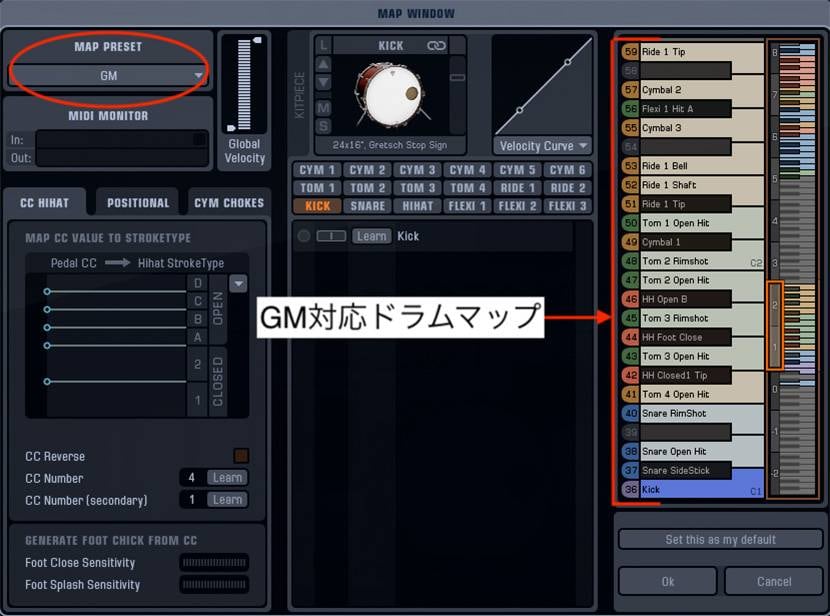
*AD2 can be switched to the GM map via its settings.
Programming Using the GM Drum Map in Practice
As a test, I switched AD2’s map to GM, programmed an 8-beat, and then loaded it into Logic.
■ Audio programmed in AD2 after switching to the GM drum map
■ Loading the above MIDI data into Logic
The result was reproduced almost exactly the same.
Of course, the sounds differ depending on the instrument, so it’s not a perfect match, but the precision is sufficient for sharing the intended beat.
Strengths and Weaknesses of the GM Drum Map
However, the GM map has not only advantages but also disadvantages.
● Advantages of the GM Drum Map
- High reproducibility across different sound sources
- Works without issues even with DAW-native instruments
- Suitable for sharing during the demo stage
● Disadvantages of the GM Drum Map
The biggest drawback is that fine expression is sacrificed.
For example, in AD2, the hi-hat can be controlled in 8 stages combining Open and Close, whereas GM only allows Open/Close, severely limiting the expressive range.
In other words, it is not suitable for detailed programming during the final production stage.
Practical Usage Guidelines
Based on the above, the optimal way to use the GM drum map is as follows:
● Situations where the GM drum map is suitable
- When sharing a song demo with band members
- In the early phase when requesting a drummer to arrange parts
- When sharing MIDI among members using different sound sources
- When you just want to play it back on a DAW-native instrument
● Situations where the GM drum map is not suitable
- When creating arrangements for the final performance
- When you want to fully utilize the nuances of a sound source
- When programming detailed velocities and articulations
To summarize
The GM drum map has a major advantage in that it preserves your drum patterns across different drum sound environments. It is highly compatible for programming at the demo stage when sharing songs within a band or music circle, making communication with drummers smoother.
On the other hand, its weakness is that it limits expressive nuances. Therefore, in the final production stage, it is necessary to switch to the original map of the sound source and refine detailed articulations.
Be sure to use each method according to the situation.
The “sound & person” column is made up of contributions from you.
For details about contributing, click here.



![[2025 Latest] How to Choose and Popularity Ranking of Drum Machines Rhythm Machines & Grooveboxes [Recommendation]](/contents/uploads/thumbs/2/2023/12/20231221_2_25065_1.jpg)

![[Recommended for drummers!] I tried out Modo Drum!](/contents/uploads/thumbs/2/2020/12/20201208_2_11761_1.jpg)

 Jamstik 特集
 DTMセール情報まとめ
 機能で選ぶ オーディオインターフェイス
 DTMに必要な機材
 おすすめサイレント楽器特集
 DTM・DAW購入ガイド
 Discount Sale
 Outlet
 New Arrivals
 Podcast (streaming)
 Headphones / Earphones
 Microphones
 Wireless Equipment
 Speakers
 Power Amps
 Mixers
 Processors
 Portable PA Systems
 Recorders
 Karaoke
 Guitars
 Basses
 Ukuleles
 Drums & Percussion
 Pianos / Synthesizers
 Wind Instruments
 Stringed Instruments
 Japanese Instruments
 Harmonicas, Other
 Software
 DJ & VJ
 Stands
 Cables & Connectors
 Racks & Cases
 Lighting
 Stage & Truss
 Video Equipment
 PC PERIPHERALS
 Power Supplies
 Studio Furniture
 Household Items, Other
 Alcoholic Beverages