Hello! This time, I’m bringing you a product review of Fender Studio Pro 8, a next-generation DAW built on PreSonus’s Studio One and attracting attention from creators around the world!
In 2026, this product was born from the fusion of PreSonus’s years of DAW expertise and Fender’s technology. While inheriting 100% of the ‘lightweight performance’ and ‘intuitive drag-and-drop workflow’ that the traditional Studio One was known for, its user interface has been redesigned, and AI functions and Fender sounds are included as standard plug-ins.
Based on the actual user experience and information on the product page, I’ll take a detailed look at the changes from previous versions of Studio One and its major new features, from the perspectives of both guitarists and creators!
Contents
- Overview of Fender Studio Pro 8
- Product Specifications
- Major Changes and New Features from Previous Versions of Studio One
- Dramatically Improved Visibility and Operability! - Channel & Arrange Overview
- Essential for Guitarists and Bassists! - Mustang Native & Rumble Native
- Cutting-Edge AI Changes the Workflow! - AI-Based Audio/Note Conversion
- Expand Your Creative Possibilities with AI Stem Separation & Chord Assistant
- Amazing Evolution with Splice Integration & a Full Lineup of Virtual Instruments
- Complete Guide Tracks in an Instant! - The New Drum Metronome Feature
- Overall Review: Who Is Fender Studio Pro 8 Recommended For?
1. Overview of Fender Studio Pro 8
Fender Studio Pro 8 is the latest music production software (DAW) developed by Fender with great anticipation. While retaining the lightweight performance of the traditional Studio One, it has undergone major enhancements such as ‘intuitive operability’, ‘integration of Fender amplifiers’, and ‘cutting-edge AI technology’, transforming it into an all-in-one music production system that stands out from previous models (older versions).
The following are the features that creators and guitarists absolutely need to know about in this update!
- No More Switching between Screens! - The Dramatically Evolved UI with Channel & Arrange Overview
- Guitarists Rejoice! - Authentic Fender Tone with 39 Types of Amplifiers
- No More Need for External Software! - AI-Based Audio/Note Conversion & Stem Separation to Improve Workflow Efficiency
- Extremely Practical for Songwriting and Practice! - AI-Powered Chord Assistant & Drum Metronome
- Even More Creative Sound Sources! - Newly Added Cinematic Lights and Spatial Expression with Spatial Audio Support
2. Product Specifications
I have compiled the product lineup and main specifications in a table below. Cross-grade versions are also available, making it easier to switch from DAWs made by other companies.
| Item | Details |
|---|---|
| Product Name | Fender Studio Pro 8 Fender Studio Pro 8 Academic Version Fender Studio Pro 8 Crossgrade Version |
| Type | Music Production Software (DAW) |
| Supported OS | Windows / macOS |
| Maximum Recording Resolution | 768 kHz / 64-bit float |
| Mixing | 64-bit mix engine, Dolby Atmos support |
| AI Functions | AI stem separation, AI note conversion (drum/note extraction), chord detection |
| Number of Plug-Ins | More than 45 native plug-ins, more than 70 FX pedals |
| Fender Integration | Mustang Native (39 guitar amp models) / Rumble Native (20+ bass amp models) |
| Effects/Pedals | More than 140 effects pedals, hundreds of professional-grade presets |
| Virtual Instruments | Cinematic Lights, Lead Architect, Sample One, Impact, Mai Tai, etc. |
| External Integration | Fender Studio (smartphone transfer), Splice, Celemony Tonalic |
| Mobile Integration | Fender Studio Pro Remote |
| File Compatibility | DAWproject support, CLAP plug-in support |
3. Major Changes and New Features from Previous Versions of Studio One
From here, let’s take a deeper look at the innovative new features that dramatically change the production workflow for creators and guitarists.
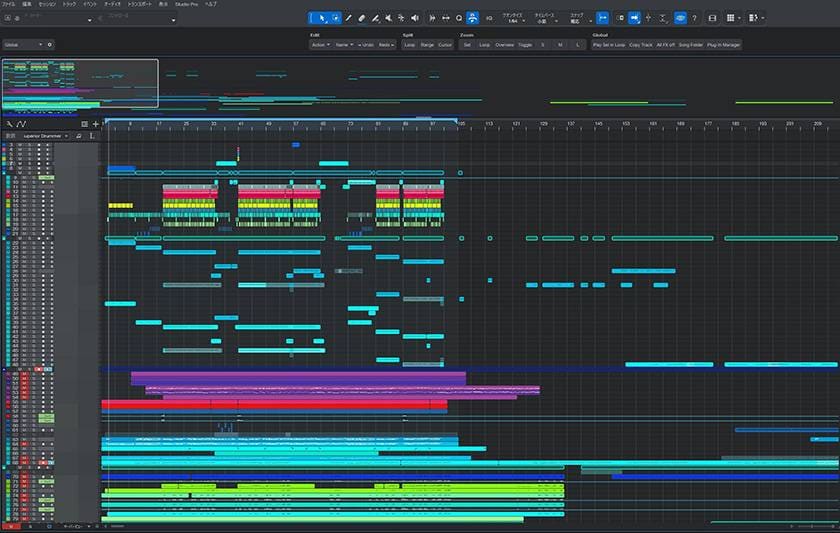
Dramatically Improved Visibility and Operability! - Channel & Arrange Overview
One of the first benefits you’ll notice in the actual production screen is the redesigned interface and new Overview functions.
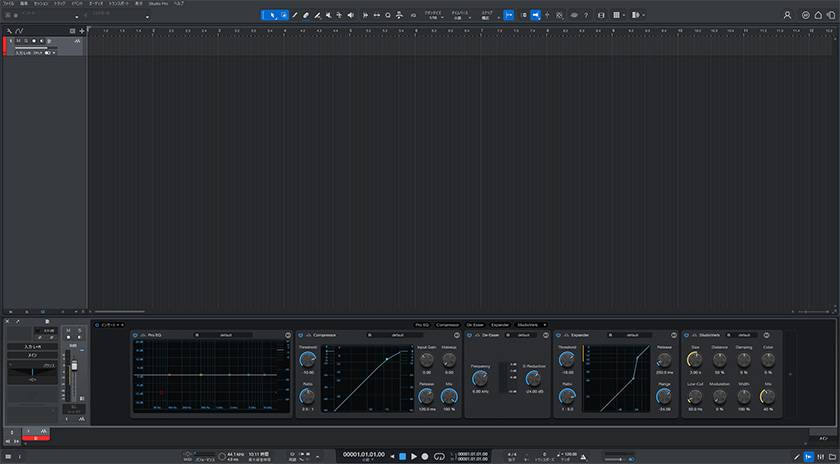
Channel Overview
A horizontal layout resembling an analog hardware mixing console is displayed across the full width of the Arrange View. This makes it possible to directly access and fine-tune important parameters of insert effects without having to open individual plug-in editors (separate windows) one by one! Not only can you switch from the Transport Bar, but being able to quickly open it simply by double-clicking a track is also exceptionally convenient.
Arrange Overview
This feature really shines when working with limited screen space, such as on a laptop. You can constantly see all tracks and the entire session in a small window, and while looking at the rectangular highlight, you can intuitively zoom in/out and pan (move) with the mouse, just like using a magnifying glass. Even in large-scale projects with more than 100 tracks, you’ll never get lost again.
Essential for Guitarists and Bassists! - Mustang Native & Rumble Native
This is the biggest advantage of having the Fender brand name! Plug-ins that faithfully recreate legendary Fender amplifiers, cabinets, and effects have been natively integrated into the DAW.
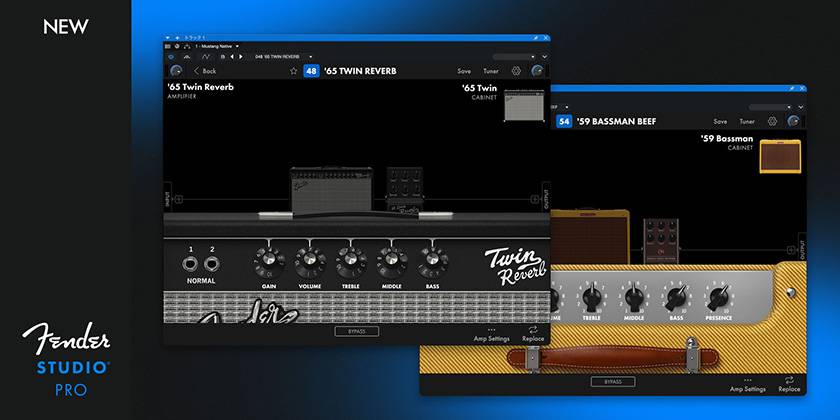
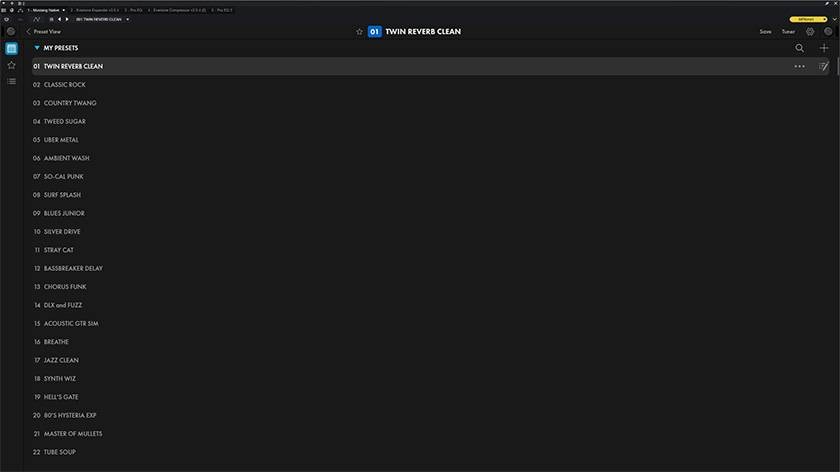
Mustang Native
39 types of guitar amplifiers. There are truly an abundance of presets, so even beginners who aren’t good at creating guitar tones can use it easily without getting lost!
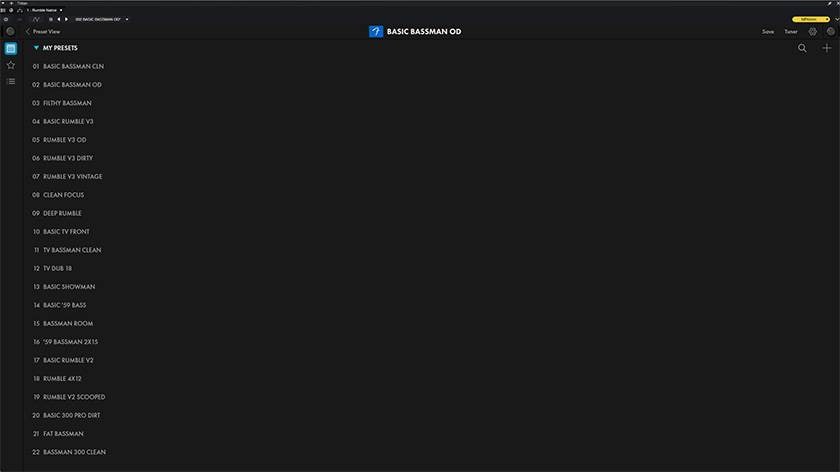
Rumble Native
18 types of bass amplifiers. As a guitarist myself, I really appreciate having so many practical presets included. I tried several of them, and the lineup ranges from easy-to-use sounds that are ready for immediate use to unusual, unconventional sounds that can serve as special effects. I found it extremely versatile and easy to use.
Comparison Audio
I made some simple comparison audio, so please give it a listen for reference!
■ Mustang/Rumble Native Comparison Audio
Simply plug your guitar or bass directly into your audio interface, and you can record with your “dream Fender tone” from the very first riff. What’s more, because the CPU load is extremely light, the system doesn’t become sluggish even when running multiple instances, and low-latency recording with a reduced buffer size is exceptionally comfortable.
Cutting-Edge AI Changes the Workflow! - AI-Based Audio/Note Conversion
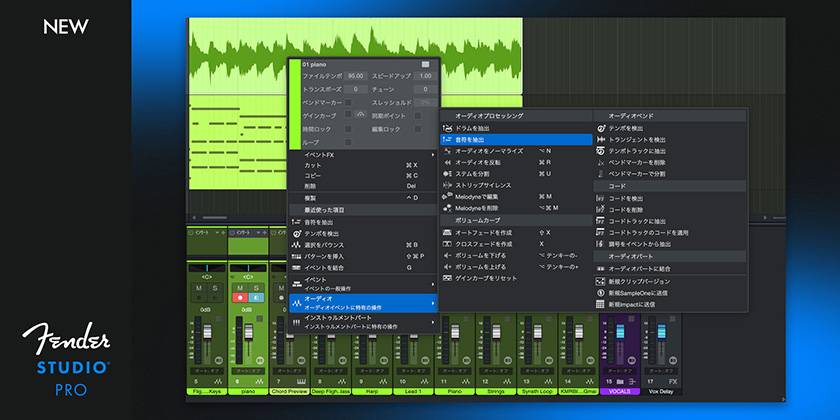
“Ah, I’d like to have that improvised guitar phrase or humming from just now traced by a synthesizer using MIDI...” In situations like this, there’s no longer even a need to launch third-party external software. You can now perform advanced note conversion using cutting-edge AI and machine learning directly within the DAW. Two extremely powerful extraction options are available, each designed based on its own unique AI model.
Note Extraction
It instantly analyzes chords played on guitars and other instruments and places them on an instrument track as accurate MIDI data.
Drum Extraction
The AI has been trained specifically for acoustic drums, allowing it to instantly identify kicks and snares from recorded drum audio. It works extremely well as a tool for replacing them with drum sounds from Impact and other drum instruments.
Furthermore, by extracting notes from audio and opening the resulting instrument part in the Score Editor, you can instantly create printable scores and lead sheets (sheet music)!
Expand Your Creative Possibilities with AI Stem Separation & Chord Assistant
AI-Powered Stem Separation
With just one click, any audio file can be instantly split and extracted into four independent stem tracks: Vocals, Drums, Bass, and Instruments. You can create tracks for learning songs by ear from 2-mix audio material, prepare samples for sampling, and complete remixes or backing tracks in just a few seconds.
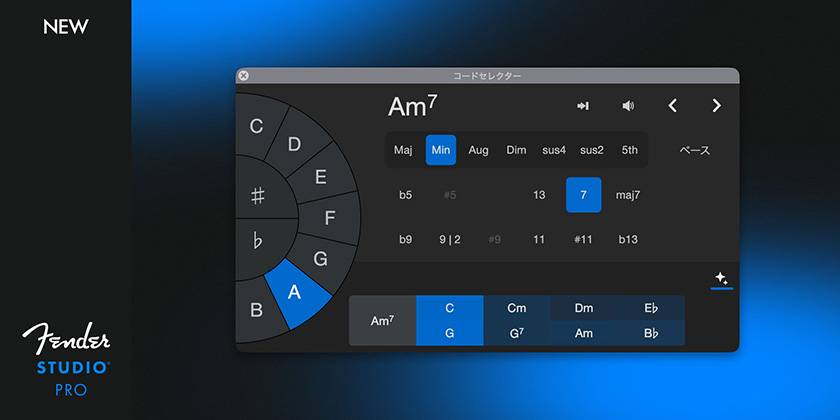
Chord Assistant
This function uses AI to suggest the optimal next chord in real time based on the chord progression and music theory. When you get stuck and run out of ideas for songwriting, you can intuitively explore creative and emotional harmonies while making use of the suggested options.
Amazing Evolution with Splice Integration & a Full Lineup of Virtual Instruments
Full Integration with Splice
You can directly access Splice’s extensive sample library without ever leaving the DAW. Furthermore, with the innovative Search with Sound function, it automatically selects the optimal samples that perfectly synchronize with the beat, key, and tempo of your project. The speed of beat-making and arranging increases dramatically.
Instruments That Produce Infinite Sounds
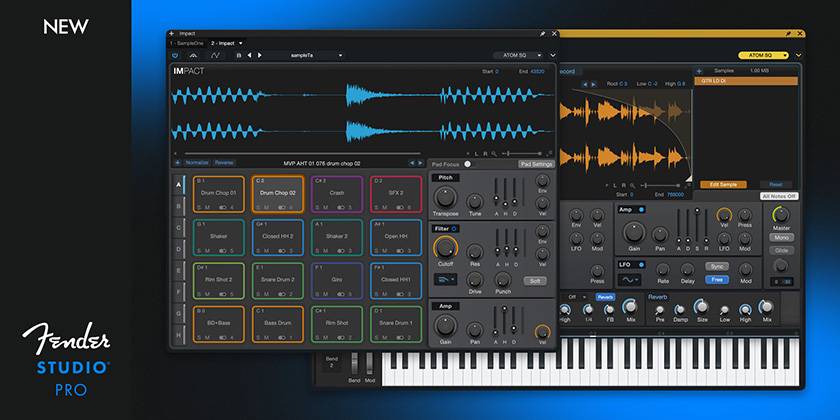
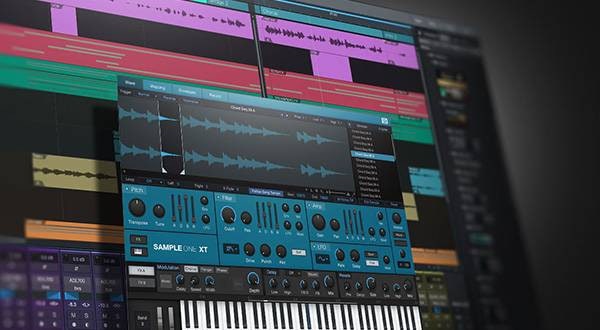
In addition to Sample One and Impact, which now offer high-precision slicing and editing, built-in sound sources such as Cinematic Lights, a soundscape instrument ideal for cinematic background sounds and layers, and Lead Architect, which helps turn inspiration into reality, provide all kinds of sounds, from punchy drums to rich pads.
Complete Guide Tracks in an Instant! - The New Drum Metronome Feature
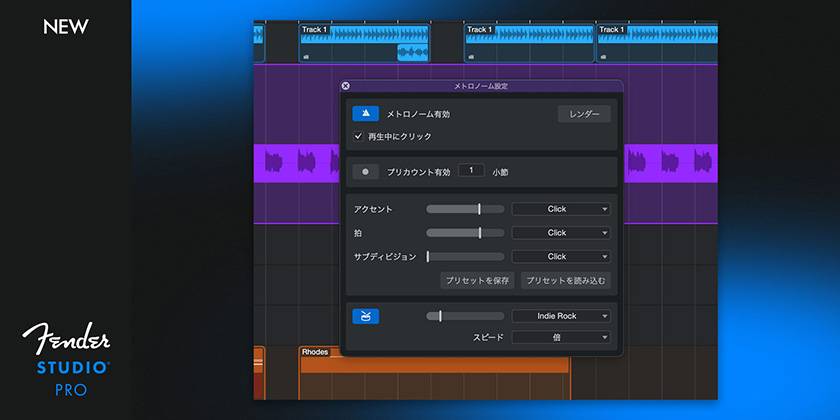
Although it may seem like a minor feature, the newly updated Drum Metronome function eliminates everyday production stress. Instead of a plain, uninspiring click sound, you can play realistic rhythm guides using 75 pattern presets and dedicated drum samples covering a variety of styles and genres. In addition to switching between double- and half-time, an option to convert the click into audio is also available, allowing you to create a drum audio track for an entire song in just a few seconds. Of course, your favorite drum patterns can be converted into editable instrument patterns, allowing you to customize them freely.
4. Overall Review: Who Is Fender Studio Pro 8 Recommended For?
In conclusion, this is undoubtedly a recommended DAW not only for former Studio One users, but also for all guitarists and creators who value inspiration.
Rather than being simply a brand-name change or minor update, the greatest strength that Studio One originally boasted—its ‘overwhelmingly lightweight performance and ease of use’—has been retained, while Fender’s ‘top-tier tone’ and ‘cutting-edge AI technology’ have been perfectly blended into it. It can truly be called an all-in-one music production system that has consolidated into the DAW’s internal workflow all the stress of opening and closing plug-in windows and all the tedious editing work previously done with external software.
Definitely recommended for:
- Former Studio One users who want to reduce the need to move between plug-in windows and increase their work speed
- Guitarists/bassists who want to easily play authentic Fender amplifier sounds (39 types) and pedals (125 types) directly through the DAW
- Those who want to maximize the efficiency of track-making and songwriting by utilizing AI functions such as stem separation and drum/note extraction
There is no other DAW in which Fender’s traditional analog tone and cutting-edge digital technology have been fused at such a high level. As a powerful partner that can take your production environment to the next stage, be sure to experience it for yourself!





![[2026] Recommended Items for Music Programming - DAW/Software Instruments/Plug-ins](/contents/uploads/thumbs/2/2020/11/20201102_2_11495_1.jpg)
 厳選!人気のおすすめオーディオインターフェイス特集
 Studio One 特集
 はじめてのギター
 DTMセール情報まとめ
 機能で選ぶ オーディオインターフェイス
 愛されたフェンダーギターたち
 Discount Sale
 Outlet
 New Arrivals
 Podcast (streaming)
 Headphones / Earphones
 Microphones
 Wireless Equipment
 Speakers
 Power Amps
 Mixers
 Processors
 Portable PA Systems
 Recorders
 Karaoke
 Guitars
 Basses
 Ukuleles
 Drums & Percussion
 Pianos / Synthesizers
 Wind Instruments
 Stringed Instruments
 Japanese Instruments
 Harmonicas, Other
 Software
 DJ & VJ
 Stands
 Cables & Connectors
 Racks & Cases
 Lighting
 Stage & Truss
 Video Equipment
 PC PERIPHERALS
 Power Supplies
 Studio Furniture
 Household Items, Other
 Alcoholic Beverages