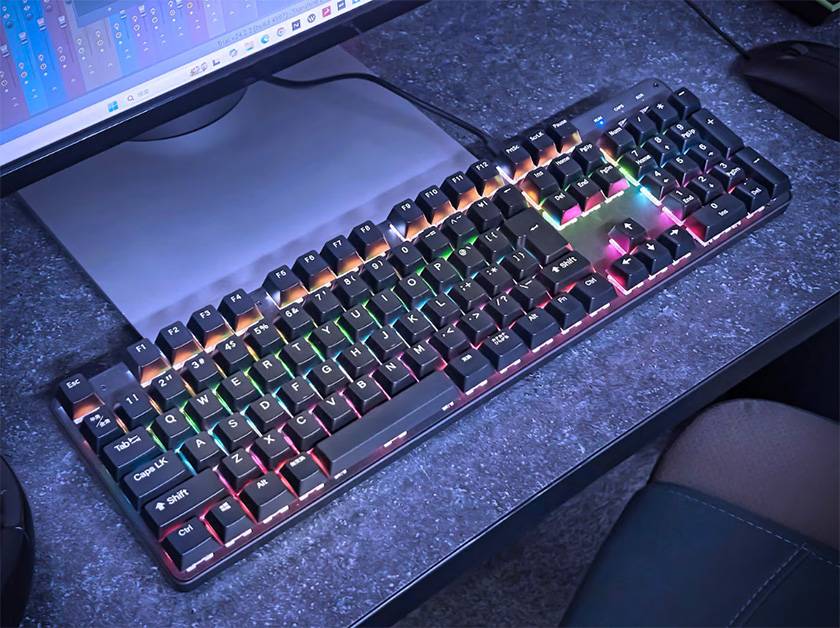
Hello everyone! This time, I’m going to introduce the PLAYTECH gaming keyboard “PGK100”, which was newly released at the end of December 2025. Many of you might be thinking, “Sound House is releasing a gaming keyboard!?” Make sure to check it out until the end!
Contents
Specifications
First, let’s take a look at the specs!
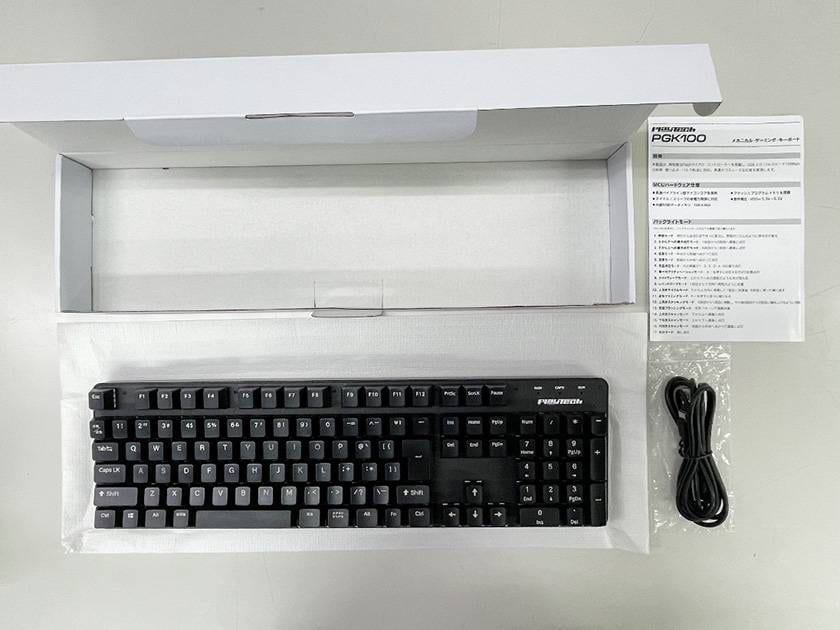
When I opened the box that arrived, it looked like this. Besides the keyboard itself, there’s a USB-C cable for connecting to a computer and a user manual. The manual includes explanations for switching backlight modes and using combination key functions, so be sure to keep it safe!
- JIS Layout (Japanese Layout)
- 108 keys (with numeric keypad)
- Key switches: Red switches
- Number of LED backlight patterns: 17 patterns
- Connection: USB 2.0 (Type-C to A), 2m cable
- Compatible OS: Windows OS, Mac OS
- Dimensions: 43.4 × 3.8 cm (without stand) / 5 cm (with stand) × 12.5 cm (W × H × D)
*Height (H) is measured at the tallest point on the back of the keyboard. - Weight: 1 kg
*Hot-swap is not supported.
Product Features
① Red Switches
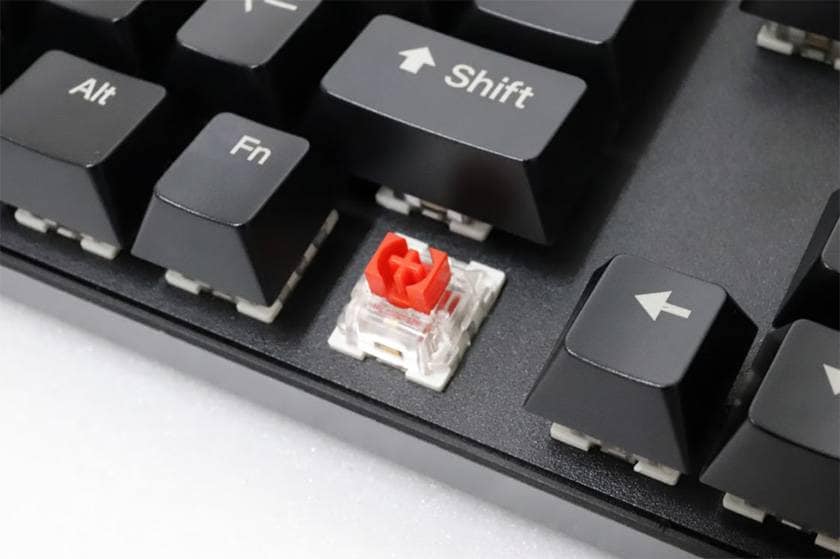
The key switches use red switches. They have a light, smooth keystroke with a satisfying clatter!
Additionally, these switches have minimal click feedback, making them ideal for fast input. Personally, I think they are perfect for a gaming keyboard.
② LED Backlight
There are 17 different lighting patterns available. You can enjoy various modes depending on your mood!
■ Backlight Modes
- Breathing Mode: Brightness gradually changes from off to full, like the rhythm of breathing.
- Top-to-Bottom Sequential Mode: Lights up sequentially from the top row to the bottom row.
- Bottom-to-Top Sequential Mode: Lights up sequentially from the bottom row to the top row.
- Diffusion Mode: Lights spread outward from the center to both ends.
- Convergence Mode: Lights move from both ends toward the center.
- Alternating Mode: Rows light up in the order 1 → 3 → 5 → 2 → 4 → 6.
- Single Row Activation Mode: Pressing a key lights up the corresponding row for 2 seconds.
- Light Wave Mode: Light flows downward like water ripples.
- Raindrop Mode: Lights flash downward like raindrops starting from the top row.
- Upward Cycle Mode: Lights move from bottom to top, reach the first row, then return to the sixth row and repeat.
- Overall Dimming Mode: Pressing a key gradually dims the lights.
- Upward Stacking Mode: Lights move from the sixth row to the first row, then stack from the sixth row to the second row.
- Alternating Flashing Mode: Lights flash continuously in an alternating pattern.
- Upward Scan Mode: Lights up sequentially from bottom to top.
- Downward Scan Mode: Lights up sequentially from top to bottom.
- Inward Scan Mode: Lights up sequentially from both ends toward the center.
- Always-On Mode: Lights remain constantly on.
③ USB-C Cable & Full-Size Keyboard with Numpad
As mentioned earlier, the keyboard comes with a detachable USB-C cable, making it convenient to carry around. Being full-size with a number pad, it’s suitable not only for gaming but also for business tasks and DTM (Desktop Music) use. The combination of “portability + versatile full-size layout” makes this a handy and practical item to have on hand. The very affordable price is another strong point of PLAYTECH!
Staff Review
The PGK100 offers incredible cost performance while still providing sufficient specs for a gaming keyboard. Thanks to the rubber on the bottom, it stays firmly in place, eliminating any slippage during typing that is common with cheap plastic keyboards, giving it a very stable feel. The key switches use red switches, which are widely appreciated, providing a smooth, light keystroke. I’ve been using the PGK100 for my daily work and even while writing this review, and the smooth keystrokes make long typing sessions less tiring for the fingers, which is a big plus. You can switch the lighting modes using FN + INS, cycling through all 17 patterns. Personally, I prefer a softer, gentle glow rather than flashing lights, so I set it to a subtle glow. This keyboard is highly recommended both as a first mechanical keyboard and as a secondary device.
So, what do you think? The PGK100 is a versatile gaming keyboard suitable for various scenarios, especially for those who are just starting gaming or want a portable secondary keyboard. If you’re concerned about the feel or material when buying online, our Narita showroom has a display model, so feel free to visit and try it out. For any other questions or comments about the product, you can also contact us by phone or email!





![[Enhancing Talk Sound Quality] How to Increase Viewer Satisfaction in Streaming, Game Streaming, and Review Videos](/contents/uploads/thumbs/2/2023/5/20230511_2_22530_1.jpg)

![[STAY HOME, PLAY GAMES!!] Play Music Games with the PLAYTECH PTK300](/contents/uploads/thumbs/2/2020/11/20201104_2_11511_1.jpg)
 ゲーミングマイク 特集
 MACKIE ブランドページ
 初心者向けUSBマイクの選び方
 IK Multimedia iRig特集
 配信・ポッドキャスト特集!(ライブ/動画/ゲーム実況)
 停電時にパソコン、作曲データを守る!!
 Discount Sale
 Outlet
 New Arrivals
 Podcast (streaming)
 Headphones / Earphones
 Microphones
 Wireless Equipment
 Speakers
 Power Amps
 Mixers
 Processors
 Portable PA Systems
 Recorders
 Karaoke
 Guitars
 Basses
 Ukuleles
 Drums & Percussion
 Pianos / Synthesizers
 Wind Instruments
 Stringed Instruments
 Japanese Instruments
 Harmonicas, Other
 Software
 DJ & VJ
 Stands
 Cables & Connectors
 Racks & Cases
 Lighting
 Stage & Truss
 Video Equipment
 PC PERIPHERALS
 Power Supplies
 Studio Furniture
 Household Items, Other
 Alcoholic Beverages