


- Software
- Plug-in/Software
- Vocal correction / processors
- WAVES/Waves Tune Real-Time (Simplified Package Version)
WAVES / Waves Tune Real-Time (Simplified Package Version)





Variations









Back Order
OVox Vocal ReSynthesis /DL
Back Order
CLA Vocals /DL
Back Order
Waves Harmony /DL

Back Order
Clarity Vx /PKG
-
Back Order
Clarity Vx /DL
Back Order
Clarity Vx Pro /DL
Back Order
Vocal Bender /PKG
Back Order
Vocal Bender /DL
Back Order
Waves Tune /DL
-
Back Order
Waves Harmony /PKG
Back Order
Waves Tune Real-Time

Back Order
Waves Tune Real-Time/DL
Download
Silk Vocal
Download
Morphoder

Download
The Kings Microphones








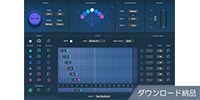











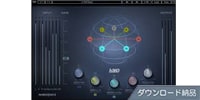



























































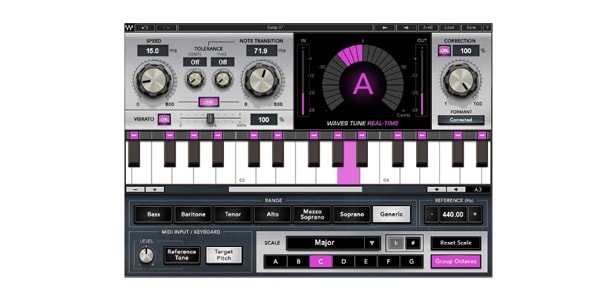
WAVES' vocal correction plugin. It provides low-latency, real-time pitch correction. Designed for studio and live use, it creates a smooth, natural sound the moment the vocalist starts singing. Pitch quantization effects, such as a robotic voice, are also available.


A dream tool for vocalists: Real-time, ultra-low latency pitch correction that preserves emotion and naturalness
To perform with confidence and focus, whether live or in the studio, there's a dream tool that corrects vocal pitch fluctuations in real time.
Waves Tune Real-Time is a plugin that performs smooth, natural-sounding vocal pitch correction literally in real time and automatically, the moment the vocalist's voice is uttered. Designed for use in live performances, pre-production, and studio mixing, Tune Real-Time features innovative pitch detection and correction technology that keeps the corrected vocal sound as natural as possible.
It can be used by producers/engineers as well as performers as a groundbreaking plugin that allows for everything from subtle pitch correction to creative pitch quantization effects to be applied in real time.
Furthermore, Waves Tune Real-Time can be programmed and customized to match the song and the vocalist's singing style. In addition to features such as note range adjustment, scale specification, exclusion or locking of specific notes, and plugin sensitivity adjustment, vocal vibrato can also be tuned while maintaining its original natural movement. If the song's scale is unclear, you can input notes from a virtual keyboard or have the plugin follow a melody played from a MIDI keyboard.
Waves Tune Real-Time can be used with Waves SoundGrid-compatible applications, including eMotion mixers, and with compatible live consoles via MultiRack SoundGrid, without requiring complex setup.
■Features
• Real-time automatic pitch correction for vocals
• Ultra-low latency for fast response
• Optimized settings for studio/live use
• Advanced formant correction preserves natural vocal sound
• Accurate correction while maintaining natural vibrato
• Creative pitch quantization effects, including ""Kero-voice,"" are also possible
• Pitch correction notes can be input via MIDI sequencing/performance
• Usable with compatible live consoles via MultiRack SoundGrid
• SoundGrid application compatible: StudioRack, MultiRack, eMotion ST, eMotion LV
■Operating Environment
Waves products may have different compatible host applications and features depending on the plugin. Please see the page below for operating environment and compatible host applications.
https://support.minet.jp/portal/ja/kb/articles/system-requirements
*An internet connection is required to use the product. (For installer download and authorization)
*After registering the serial number listed on the ""Product Serial Number Sheet"" included in the package on the manufacturer's website, you will need to download and activate the installer using the license management software, Waves Central.
For detailed instructions, please access the ""Waves Comprehensive Manual"" URL listed on the Product Serial Number Sheet and view the WavesSetup PDF.
*Please refer to the Waves Product Frequently Asked Questions - Installation/Troubleshooting
This is the manufacturer's website.
To perform with confidence and focus, whether live or in the studio, there's a dream tool that corrects vocal pitch fluctuations in real time.
Waves Tune Real-Time is a plugin that performs smooth, natural-sounding vocal pitch correction literally in real time and automatically, the moment the vocalist's voice is uttered. Designed for use in live performances, pre-production, and studio mixing, Tune Real-Time features innovative pitch detection and correction technology that keeps the corrected vocal sound as natural as possible.
It can be used by producers/engineers as well as performers as a groundbreaking plugin that allows for everything from subtle pitch correction to creative pitch quantization effects to be applied in real time.
Furthermore, Waves Tune Real-Time can be programmed and customized to match the song and the vocalist's singing style. In addition to features such as note range adjustment, scale specification, exclusion or locking of specific notes, and plugin sensitivity adjustment, vocal vibrato can also be tuned while maintaining its original natural movement. If the song's scale is unclear, you can input notes from a virtual keyboard or have the plugin follow a melody played from a MIDI keyboard.
Waves Tune Real-Time can be used with Waves SoundGrid-compatible applications, including eMotion mixers, and with compatible live consoles via MultiRack SoundGrid, without requiring complex setup.
■Features
• Real-time automatic pitch correction for vocals
• Ultra-low latency for fast response
• Optimized settings for studio/live use
• Advanced formant correction preserves natural vocal sound
• Accurate correction while maintaining natural vibrato
• Creative pitch quantization effects, including ""Kero-voice,"" are also possible
• Pitch correction notes can be input via MIDI sequencing/performance
• Usable with compatible live consoles via MultiRack SoundGrid
• SoundGrid application compatible: StudioRack, MultiRack, eMotion ST, eMotion LV
■Operating Environment
Waves products may have different compatible host applications and features depending on the plugin. Please see the page below for operating environment and compatible host applications.
https://support.minet.jp/portal/ja/kb/articles/system-requirements
*An internet connection is required to use the product. (For installer download and authorization)
*After registering the serial number listed on the ""Product Serial Number Sheet"" included in the package on the manufacturer's website, you will need to download and activate the installer using the license management software, Waves Central.
For detailed instructions, please access the ""Waves Comprehensive Manual"" URL listed on the Product Serial Number Sheet and view the WavesSetup PDF.
*Please refer to the Waves Product Frequently Asked Questions - Installation/Troubleshooting
This is the manufacturer's website.
商品レビューProduct Review




不適切な投稿として報告しますか?
理由
ご協力ありがとうございました
投稿を削除しますか?
投稿されたレビューを削除しました。
WAVES
Waves Tune Real-Time (Simplified Package Version)
Item ID:290300
Regular Price:¥26,400(incl. tax)
¥7,040(incl. tax)

351Pt(5%)Detail
- 70Pts
通常ポイント
- 281Pts
ポイント5倍キャンペーン
- 351Pts
Total
限定特価
 Back Order
 - In Stock
- In Stock, can be shipped when order is confirmed.
- Low Stock
- Low Stock, may be sold out soon.
- Scheduled date
- Expected to arrive at Sound House on this date.
- TBA
- Expected date of arrival at Sound House to be determined.
- Back Order
- It needs to be orderd from the manufacturer. Please inquire about the estimated date of arrival.
- Mfr. Delivery
- Must be ordered from manufacturer. Please inquire about the estimated date of arrival.
- Download
- Only the serial number will be sent to your registered email address.
- Special Order
- Made to order item or must be ordered from manufacturer. May take several weeks or months.
- No Longer Available
- Product is no longer available due to having been discoutined or other reasons.
Rating


この商品に関連するセレクションRelated Articles



-
 Discount Sale
-
 Outlet
-
 New Arrivals
-
 Podcast (streaming)
-
 Headphones / Earphones
-
 Microphones
-
 Wireless Equipment
-
 Speakers
-
 Power Amps
-
 Mixers
-
 Processors
-
 Portable PA Systems
-
 Recorders
-
 Karaoke
-
 Guitars
-
 Basses
-
 Ukuleles
-
 Drums & Percussion
-
 Pianos / Synthesizers
-
 Wind Instruments
-
 Stringed Instruments
-
 Japanese Instruments
-
 Harmonicas, Other
-
 Software
-
 DJ & VJ
-
 Stands
-
 Cables & Connectors
-
 Racks & Cases
-
 Lighting
-
 Stage & Truss
-
 Video Equipment
-
 PC PERIPHERALS
-
 Power Supplies
-
 Studio Furniture
-
 Household Items, Other
-
 Alcoholic Beverages
Search by Brand
Brand List








- Sound House
- 〒286-0825 14-3 Shinizumi , Narita City, Chiba
- Monday-Friday 10:00-17:00
- Narita Call Center
- TEL. 0476-89-1111
- FAX. 0476-89-2222
- Tokushima Call Center
- TEL. 0885-38-1111
- FAX. 0885-38-1100
- Showroom Hours
- Monday-Friday 10:00-17:00
closed on Saturdays, Sundays and Holidays


© Sound House

すべてのレビューを見る