




- Guitars
- GUITAR EFFECTOR
- Fuzz
- TEACHING MACHINES/FuzzBillion
TEACHING MACHINES / FuzzBillion
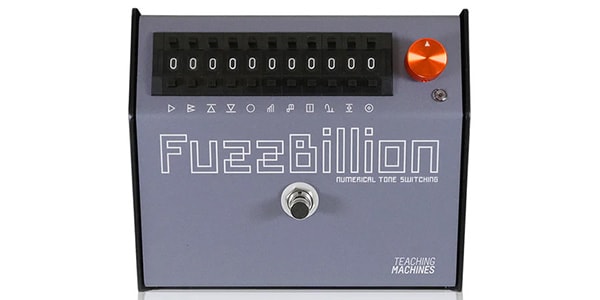
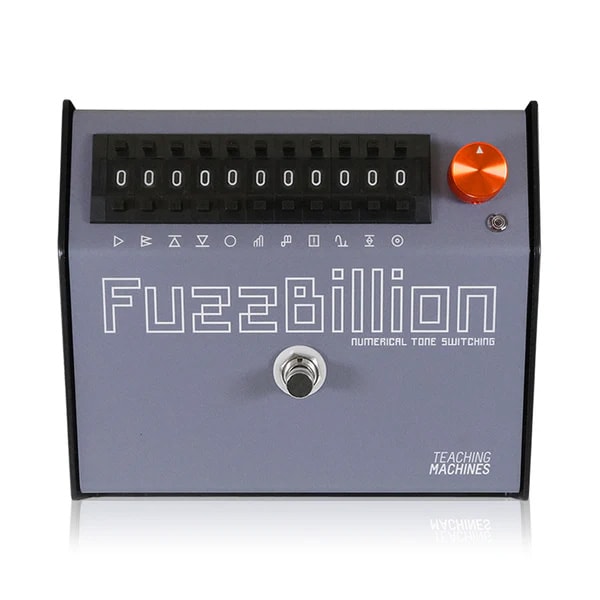
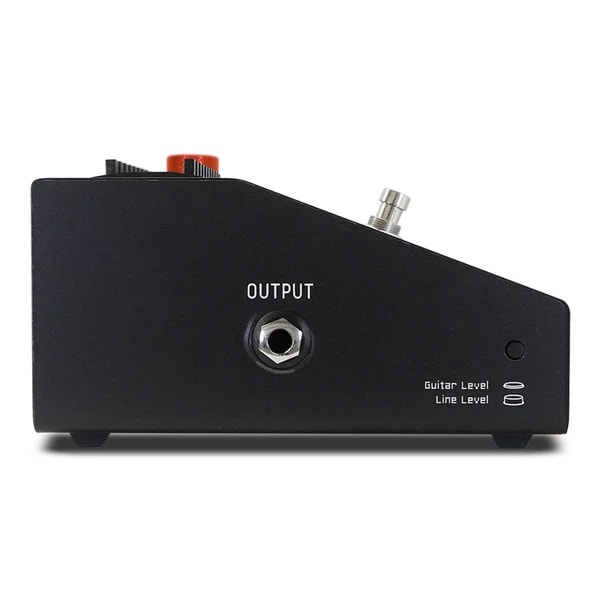
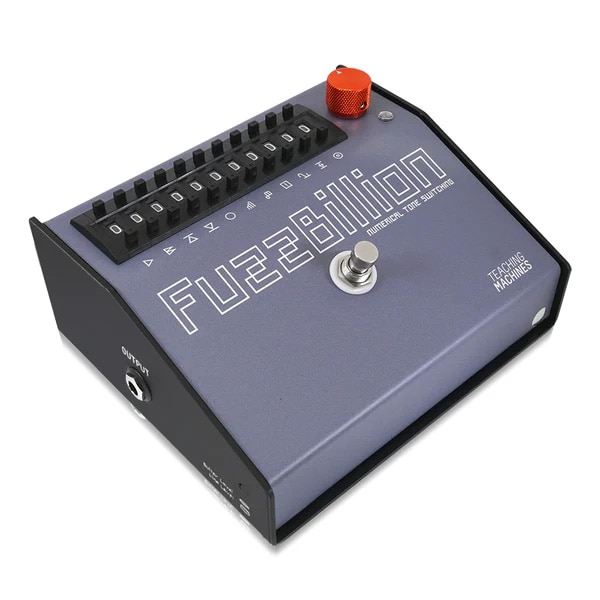


<> The TEACHING MACHINES Fuzz Billion is an effects pedal that adds distortion to guitars, basses, and synthesizers. It supports unbalanced guitar and bass signals, as well as TRS balanced line-level signals.
The 11 wheel switches on the pedal allow you to select modes 0 through 9 with the press of a button. Combining these switch modes allows you to achieve a wide range of sounds, from subtle overdrive to intense distortion.
This fully analog design utilizes a variety of diodes and amplification elements, including germanium, silicon, and LEDs.
The internal signal flows from left to right of the wheel. Changing the wheel mode affects the rear of the signal.
As this is a fully analog pedal, there are no presets, but you can easily restore your settings by writing down the mode switch number.
■KEY POINTS
- Achieve a wide variety of sounds by combining the 11 wheel switches.
- Covers everything from subtle overdrive to intense distortion.
- Write down the number to easily restore your settings.
■Control Knobs/Input/Output Switches
- GAIN Knob: This is the output level knob that adjusts the overall volume.
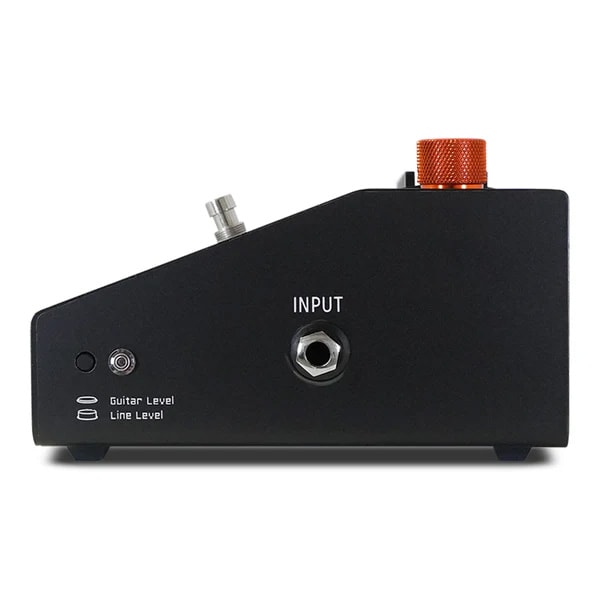
- Guitar Level/Line Level (Input): Switches between unbalanced TS mono input and balanced TRS mono input. For balanced signals, the connection is Tip=Hot, Ring=Cold, Sleeve=Shield.
TS unbalanced cables can be connected even in line level mode.
The line input has an impedance of approximately 1K and is transformer balanced.
Using a guitar in line level mode produces a softer tone.
・Guitar Level/Line Level (Output): Switches between unbalanced TS mono output and balanced TRS mono output. For balanced signals, the connection is Tip=Hot, Ring=Cold, Sleeve=Shield.
TS unbalanced cables can be connected even in line level mode.
The line output has an impedance of approximately 1K and is transformer balanced.
The line output stage and transformer are connected after the GAIN knob. Increasing the output level will saturate the transformer. If the output level is too high, reduce the volume of the device connected to the input.
The input and output levels can be set differently. For example, you can output a guitar or bass input as a line-level DI output.
■Wheel Switches
FuzzBillion has 11 wheel switches. From left to right, they are called Wheel 1, Wheel 2, and so on.
-Functions of the Wheel Switches
Wheel 1: Gain Boost
Setting 0 is bypass, 1-4 are opamp gain boost, and 5-8 are single-transistor boost. Setting 9 is an extreme boost with an additional transistor.
Wheels 2-4: Clipping Selection and Gain
These wheels work in combination to select clipping itself and change the gain around clipping. Wheel 2 selects gain, and Wheels 3 and 4 select clipping. Wheel 3 is negative clipping, and Wheel 4 is positive clipping.
The clipping settings selectable with Wheels 3 and 4 are as follows:
0: Germanium Diode: Smooth clipping at low voltage
1: 1N60P Silicon Diode: Sharp cutoff at high voltage
2: 1N4148 Silicon Diode: Sharper at higher voltage
3: LED: Hard clipping due to gain
4: Uses a capacitor instead of a diode: Treble-cut sound
*Wheels 3 and 4 use different capacitors. Wheel 3 uses a smaller capacitor and has less treble cut. Combined with a diode, it can create lively distortion.
5: No clipping
6-9: Adds resistors to settings 0-3 and increases voltage. Less clipping and higher volume.
Wheel 5: Tone
Setting 0 provides the strongest low frequencies, while setting 8 provides the strongest high frequencies. Setting 9 bypasses the tone. Setting it to 9 also increases the volume.
Wheels 6 & 7: Octave Fuzz
Octave Fuzz creates a sound an octave higher by halving the waveforms and combining them. Wheel 6 controls the Octave Fuzz Drive, and Wheel 7 controls the Octave Mix.
Wheel 8: PLL
PLL stands for Phase Locked Loop, which is like an oscillator playing along with the input signal. Wheel 8 controls how fast and accurately the pitch tracks. Most settings result in unpredictable, quirky behavior and added noise.
The PLL requires a large signal to respond, so depending on the gain and clipping settings, it may not produce any sound at all.
Wheel 8 Settings
0: Bypass PLL
1: Slow portamento, unstable sound
2: Faster portamento, unstable sound
3: Slow portamento, noisy sound
4: Fast, glitchy sound
5: Characteristic sound
6: Even more characteristic sound
7: Very slow portamento, stable pitch
8: Ring modulator-like sound. Switches audio rates between the post-Octave Fuzz signal and the signal after the first fuzz stage, but before the EQ. 9: Same as 8, but faster tracking.
Wheel 9: BIAS Offset
Wheel 9 controls the ""0"" position of the waveform after the fuzz loop's Opamp, first tone buffer, and octave fuzz.
Setting Wheel 9 moves the entire waveform up or down. Because of the limited range, the top or bottom of the waveform may clip, resulting in choppy or unpleasant sounds. It can sometimes be used effectively in conjunction with the clipping setting. Changing this setting takes about 5 seconds for the circuit to stabilize. Setting 0 is the most neutral setting.
1-5: Moves the waveform in the negative direction, with 5 being the most.
6-9: Moves the waveform in the positive direction, with 6 being the most and 9 the least.
Wheel 10: Output Clip
This is a more traditional way of controlling distortion than Opamp clipping. It not only reduces the apparent volume, but also smooths the fuzz sound and extends its sustain.
The two diodes function symmetrically, but they also have an unusual mode. Because they're near the end of the signal chain, they affect almost every switch. They clip the waveform, reducing the volume. Adjust the volume with the GAIN knob.
The higher the number, the more distinctive the effect.
0: OFF
1: Blue and Green LEDs: Adds a few harmonics and cuts a little off the top of the signal.
2: Red LED: Hard and bright sound
3: 1N4148 silicon diode + 1K resistor: Hard clipping at low volume
4: 1N60P silicon diode + 47N capacitor: Treble cut and strong midrange sound
5: 1N60P silicon diode + 1μF capacitor: More treble cut sound
6: 1N60P + 1K resistor: Bright and long sustain
7: 1N4148 diode: Hard clipping
8: 1N60P diode: Stronger clipping
9: Germanium diode: Strongest clipping and long sustain
Wheel 11: Output Tone
Controls a single-pole low-pass filter. 0 is bypass, and from 1 to 9, higher numbers reduce treble.
Changing the setting not only reduces the gain of the fixed-frequency filter, but also changes the frequency at which the filter is located.
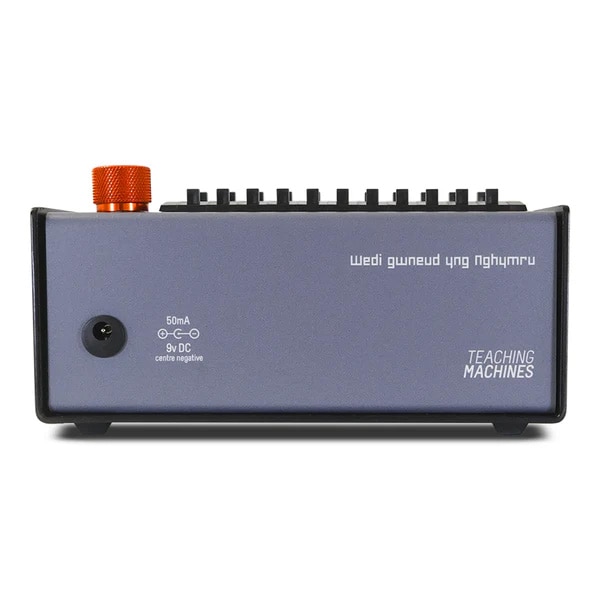
Power Supply: The Fuzz Billion operates on a standard 9V DC power supply (2.1mm barrel type, center negative). It consumes 50mA. Batteries are not supported.
This fully analog design utilizes a variety of diodes and amplification elements, including germanium, silicon, and LEDs.
The internal signal flows from left to right of the wheel. Changing the wheel mode affects the rear of the signal.
As this is a fully analog pedal, there are no presets, but you can easily restore your settings by writing down the mode switch number.
■KEY POINTS
- Achieve a wide variety of sounds by combining the 11 wheel switches.
- Covers everything from subtle overdrive to intense distortion.
- Write down the number to easily restore your settings.
■Control Knobs/Input/Output Switches
- GAIN Knob: This is the output level knob that adjusts the overall volume.
- Guitar Level/Line Level (Input): Switches between unbalanced TS mono input and balanced TRS mono input. For balanced signals, the connection is Tip=Hot, Ring=Cold, Sleeve=Shield.
TS unbalanced cables can be connected even in line level mode.
The line input has an impedance of approximately 1K and is transformer balanced.
Using a guitar in line level mode produces a softer tone.
・Guitar Level/Line Level (Output): Switches between unbalanced TS mono output and balanced TRS mono output. For balanced signals, the connection is Tip=Hot, Ring=Cold, Sleeve=Shield.
TS unbalanced cables can be connected even in line level mode.
The line output has an impedance of approximately 1K and is transformer balanced.
The line output stage and transformer are connected after the GAIN knob. Increasing the output level will saturate the transformer. If the output level is too high, reduce the volume of the device connected to the input.
The input and output levels can be set differently. For example, you can output a guitar or bass input as a line-level DI output.
■Wheel Switches
FuzzBillion has 11 wheel switches. From left to right, they are called Wheel 1, Wheel 2, and so on.
-Functions of the Wheel Switches
Wheel 1: Gain Boost
Setting 0 is bypass, 1-4 are opamp gain boost, and 5-8 are single-transistor boost. Setting 9 is an extreme boost with an additional transistor.
Wheels 2-4: Clipping Selection and Gain
These wheels work in combination to select clipping itself and change the gain around clipping. Wheel 2 selects gain, and Wheels 3 and 4 select clipping. Wheel 3 is negative clipping, and Wheel 4 is positive clipping.
The clipping settings selectable with Wheels 3 and 4 are as follows:
0: Germanium Diode: Smooth clipping at low voltage
1: 1N60P Silicon Diode: Sharp cutoff at high voltage
2: 1N4148 Silicon Diode: Sharper at higher voltage
3: LED: Hard clipping due to gain
4: Uses a capacitor instead of a diode: Treble-cut sound
*Wheels 3 and 4 use different capacitors. Wheel 3 uses a smaller capacitor and has less treble cut. Combined with a diode, it can create lively distortion.
5: No clipping
6-9: Adds resistors to settings 0-3 and increases voltage. Less clipping and higher volume.
Wheel 5: Tone
Setting 0 provides the strongest low frequencies, while setting 8 provides the strongest high frequencies. Setting 9 bypasses the tone. Setting it to 9 also increases the volume.
Wheels 6 & 7: Octave Fuzz
Octave Fuzz creates a sound an octave higher by halving the waveforms and combining them. Wheel 6 controls the Octave Fuzz Drive, and Wheel 7 controls the Octave Mix.
Wheel 8: PLL
PLL stands for Phase Locked Loop, which is like an oscillator playing along with the input signal. Wheel 8 controls how fast and accurately the pitch tracks. Most settings result in unpredictable, quirky behavior and added noise.
The PLL requires a large signal to respond, so depending on the gain and clipping settings, it may not produce any sound at all.
Wheel 8 Settings
0: Bypass PLL
1: Slow portamento, unstable sound
2: Faster portamento, unstable sound
3: Slow portamento, noisy sound
4: Fast, glitchy sound
5: Characteristic sound
6: Even more characteristic sound
7: Very slow portamento, stable pitch
8: Ring modulator-like sound. Switches audio rates between the post-Octave Fuzz signal and the signal after the first fuzz stage, but before the EQ. 9: Same as 8, but faster tracking.
Wheel 9: BIAS Offset
Wheel 9 controls the ""0"" position of the waveform after the fuzz loop's Opamp, first tone buffer, and octave fuzz.
Setting Wheel 9 moves the entire waveform up or down. Because of the limited range, the top or bottom of the waveform may clip, resulting in choppy or unpleasant sounds. It can sometimes be used effectively in conjunction with the clipping setting. Changing this setting takes about 5 seconds for the circuit to stabilize. Setting 0 is the most neutral setting.
1-5: Moves the waveform in the negative direction, with 5 being the most.
6-9: Moves the waveform in the positive direction, with 6 being the most and 9 the least.
Wheel 10: Output Clip
This is a more traditional way of controlling distortion than Opamp clipping. It not only reduces the apparent volume, but also smooths the fuzz sound and extends its sustain.
The two diodes function symmetrically, but they also have an unusual mode. Because they're near the end of the signal chain, they affect almost every switch. They clip the waveform, reducing the volume. Adjust the volume with the GAIN knob.
The higher the number, the more distinctive the effect.
0: OFF
1: Blue and Green LEDs: Adds a few harmonics and cuts a little off the top of the signal.
2: Red LED: Hard and bright sound
3: 1N4148 silicon diode + 1K resistor: Hard clipping at low volume
4: 1N60P silicon diode + 47N capacitor: Treble cut and strong midrange sound
5: 1N60P silicon diode + 1μF capacitor: More treble cut sound
6: 1N60P + 1K resistor: Bright and long sustain
7: 1N4148 diode: Hard clipping
8: 1N60P diode: Stronger clipping
9: Germanium diode: Strongest clipping and long sustain
Wheel 11: Output Tone
Controls a single-pole low-pass filter. 0 is bypass, and from 1 to 9, higher numbers reduce treble.
Changing the setting not only reduces the gain of the fixed-frequency filter, but also changes the frequency at which the filter is located.
Power Supply: The Fuzz Billion operates on a standard 9V DC power supply (2.1mm barrel type, center negative). It consumes 50mA. Batteries are not supported.
関連商品
-
¥10,800(incl. tax)
 In Stock
 -
¥110(incl. tax)
In Stock -
¥80(incl. tax)
In Stock -
 ELECTRO-HARMONIX / EHX 9V Battery
¥250(incl. tax)
In Stock -
 PLAYTECH / Position Seal Red/White
¥380(incl. tax)
In Stock -
 CLASSIC PRO / Power adapter DC9V 0.5A 2.1mm center negative
¥680(incl. tax)
 Approx. 1 weeks
 -
 One Control / HOOK & LOOP - HOOK 1m
¥416(incl. tax)
In Stock -
 One Control / HOOK & LOOP - LOOP 1m
¥416(incl. tax)
In Stock -
¥580(incl. tax)
Back Order -
¥2,860(incl. tax)
In Stock
 TC ELECTRONIC / Polytune 3
 CLASSIC PRO / CP9VX ALK
 CLASSIC PRO / CP9VXMN
 PLAYTECH / Pedal Riser 10
 BOSS / PSA-100S2
商品レビューProduct Review




不適切な投稿として報告しますか?
理由
ご協力ありがとうございました
投稿を削除しますか?
投稿されたレビューを削除しました。
TEACHING MACHINES
FuzzBillion
Item ID:381429
99,000 yen(incl. tax)

990Pt(1%)Detail
- 990Pts
通常ポイント
- 990Pts
Total
- In Stock
- In Stock, can be shipped when order is confirmed.
- Low Stock
- Low Stock, may be sold out soon.
- Scheduled date
- Expected to arrive at Sound House on this date.
- TBA
- Expected date of arrival at Sound House to be determined.
- Back Order
- It needs to be orderd from the manufacturer. Please inquire about the estimated date of arrival.
- Mfr. Delivery
- Must be ordered from manufacturer. Please inquire about the estimated date of arrival.
- Download
- Only the serial number will be sent to your registered email address.
- Special Order
- Made to order item or must be ordered from manufacturer. May take several weeks or months.
- No Longer Available
- Product is no longer available due to having been discoutined or other reasons.
Rating


この商品に関連するセレクションRelated Articles



-
 Discount Sale
-
 Outlet
-
 New Arrivals
-
 Podcast (streaming)
-
 Headphones / Earphones
-
 Microphones
-
 Wireless Equipment
-
 Speakers
-
 Power Amps
-
 Mixers
-
 Processors
-
 Portable PA Systems
-
 Recorders
-
 Karaoke
-
 Guitars
-
 Basses
-
 Ukuleles
-
 Drums & Percussion
-
 Pianos / Synthesizers
-
 Wind Instruments
-
 Stringed Instruments
-
 Japanese Instruments
-
 Harmonicas, Other
-
 Software
-
 DJ & VJ
-
 Stands
-
 Cables & Connectors
-
 Racks & Cases
-
 Lighting
-
 Stage & Truss
-
 Video Equipment
-
 PC PERIPHERALS
-
 Power Supplies
-
 Studio Furniture
-
 Household Items, Other
-
 Alcoholic Beverages
Search by Brand
Brand List








- Sound House
- 〒286-0825 14-3 Shinizumi , Narita City, Chiba
- Monday-Friday 10:00-17:00
- Narita Call Center
- TEL. 0476-89-1111
- FAX. 0476-89-2222
- Tokushima Call Center
- TEL. 0885-38-1111
- FAX. 0885-38-1100
- Showroom Hours
- Monday-Friday 10:00-17:00
closed on Saturdays, Sundays and Holidays


© Sound House

すべてのレビューを見る