




- Software
- PLUG IN / SOFTWARE
- Compressors / limiters / EQs
- APOGEE/Soft Limit Native Plugin download delivery
APOGEE / Soft Limit Native Plugin download delivery
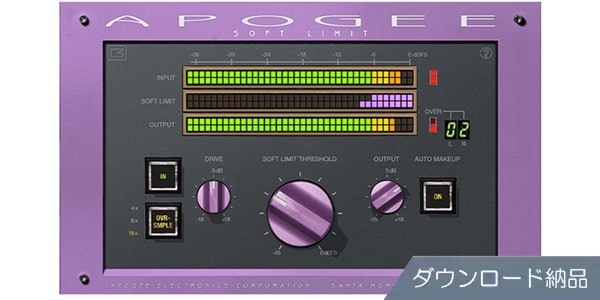
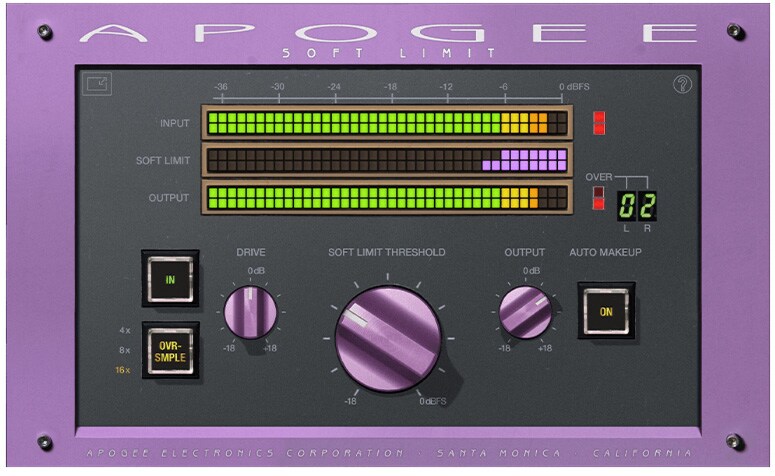


Soft Limit tape emulation and Apogee converters. Downloadable.
■Plugins
■Tape Simulator
------------------------------
■Download Delivery
- Approximately 10 minutes after completing your purchase, the activation code will be delivered to your registered email address.
- Activate the code you received on the D2R page below and you will receive product installation information via email. (You can also view the information by clicking the email icon on the D2R page.)
D2R Page
*If you do not have a D2R Page account, please register by clicking ""Register Here"" on the D2R page.
- You can also check your D2R registration activation code by clicking ""Order Details"" under ""My Page"" on Sound House's Purchase History.
*It may take a few minutes for the information to be updated in your purchase history.
- Clicking ""Support Information"" under ""Order Details"" will display activation information.
For installation and usage details, please contact the manufacturer.
------------------------------
Soft Limit Tape Emulation and Apogee Converters
Soft Limit has been an essential feature of Apogee converters since the release of the AD-500 in 1991. This simple and effective analog tape emulation is now available as an audio plug-in for the first time.
During the development of the AD-500, we discovered that while digital audio offers distortion-free performance, the technical shortcomings of analog tape are what engineers find so appealing. Therefore, we developed the Soft Limit, which places an analog circuit before the AD conversion stage to beautifully round transients and add harmonic warmth.
Parameters
・Adjustable Soft Limit Threshold
The original Soft Limit circuit had a fixed threshold, limiting its use. The Soft Limit plug-in allows you to adjust the threshold down to -18dBfs, allowing you to fine-tune the signal to suit your source.
・Auto Makeup: When Auto Makeup is enabled, lowering the Soft Limit threshold will adjust the gain appropriately to maintain the volume level. This allows you to focus on the sound without unnecessary volume adjustments.
・Drive
The Drive knob allows ±18dB of level trimming before the Soft Limit. This allows for fine adjustments, such as adding more ""crunch.""
・Output
The Output knob allows ±18dB of trimming. This allows you to optimize the plug-in output for the next stage in your DAW.
・Ovr-Smple
Achieve oversampling rates up to 16x, preventing problems such as aliasing. Even at the highest oversampling rates, Soft Limit uses CPU power efficiently and achieves ultra-low latency.
・Input, Output, and Soft Limit Meters
Soft Limit's precise Input, Output, and Reduction level meters show you exactly how Soft Limit is shaping your sound.
■ Operating Environment
For system requirements, operating environment, compatible host applications, etc., please visit the product page on the manufacturer's website .
■Tape Simulator
------------------------------
■Download Delivery
- Approximately 10 minutes after completing your purchase, the activation code will be delivered to your registered email address.
- Activate the code you received on the D2R page below and you will receive product installation information via email. (You can also view the information by clicking the email icon on the D2R page.)
D2R Page
*If you do not have a D2R Page account, please register by clicking ""Register Here"" on the D2R page.
- You can also check your D2R registration activation code by clicking ""Order Details"" under ""My Page"" on Sound House's Purchase History.
*It may take a few minutes for the information to be updated in your purchase history.
- Clicking ""Support Information"" under ""Order Details"" will display activation information.
For installation and usage details, please contact the manufacturer.
------------------------------
Soft Limit Tape Emulation and Apogee Converters
Soft Limit has been an essential feature of Apogee converters since the release of the AD-500 in 1991. This simple and effective analog tape emulation is now available as an audio plug-in for the first time.
During the development of the AD-500, we discovered that while digital audio offers distortion-free performance, the technical shortcomings of analog tape are what engineers find so appealing. Therefore, we developed the Soft Limit, which places an analog circuit before the AD conversion stage to beautifully round transients and add harmonic warmth.
Parameters
・Adjustable Soft Limit Threshold
The original Soft Limit circuit had a fixed threshold, limiting its use. The Soft Limit plug-in allows you to adjust the threshold down to -18dBfs, allowing you to fine-tune the signal to suit your source.
・Auto Makeup: When Auto Makeup is enabled, lowering the Soft Limit threshold will adjust the gain appropriately to maintain the volume level. This allows you to focus on the sound without unnecessary volume adjustments.
・Drive
The Drive knob allows ±18dB of level trimming before the Soft Limit. This allows for fine adjustments, such as adding more ""crunch.""
・Output
The Output knob allows ±18dB of trimming. This allows you to optimize the plug-in output for the next stage in your DAW.
・Ovr-Smple
Achieve oversampling rates up to 16x, preventing problems such as aliasing. Even at the highest oversampling rates, Soft Limit uses CPU power efficiently and achieves ultra-low latency.
・Input, Output, and Soft Limit Meters
Soft Limit's precise Input, Output, and Reduction level meters show you exactly how Soft Limit is shaping your sound.
■ Operating Environment
For system requirements, operating environment, compatible host applications, etc., please visit the product page on the manufacturer's website .
商品レビューProduct Review




不適切な投稿として報告しますか?
理由
ご協力ありがとうございました
投稿を削除しますか?
投稿されたレビューを削除しました。
APOGEE
Soft Limit Native Plugin download delivery
Item ID:376448
1,540 yen(incl. tax)
- Free shipping on orders over 3,000 yen
15Pt(1%)Detail
- 15Pts
通常ポイント
- 15Pts
Total
 Download
 Only the serial number will be sent to your registered email address. Orders cannot be changed or cancelled after they have been placed by the customer.
- In Stock
- In Stock, can be shipped when order is confirmed.
- Low Stock
- Low Stock, may be sold out soon.
- Scheduled date
- Expected to arrive at Sound House on this date.
- TBA
- Expected date of arrival at Sound House to be determined.
- Back Order
- It needs to be orderd from the manufacturer. Please inquire about the estimated date of arrival.
- Mfr. Delivery
- Must be ordered from manufacturer. Please inquire about the estimated date of arrival.
- Download
- Only the serial number will be sent to your registered email address.
- Special Order
- Made to order item or must be ordered from manufacturer. May take several weeks or months.
- No Longer Available
- Product is no longer available due to having been discoutined or other reasons.
Rating


この商品に関連するセレクションRelated Articles


-
 Discount Sale
-
 Outlet
-
 New Arrivals
-
 Podcast (streaming)
-
 Headphones / Earphones
-
 Microphones
-
 Wireless Equipment
-
 Speakers
-
 Power Amps
-
 Mixers
-
 Processors
-
 Portable PA Systems
-
 Recorders
-
 Karaoke
-
 Guitars
-
 Basses
-
 Ukuleles
-
 Drums & Percussion
-
 Pianos / Synthesizers
-
 Wind Instruments
-
 Stringed Instruments
-
 Japanese Instruments
-
 Harmonicas, Other
-
 Software
-
 DJ & VJ
-
 Stands
-
 Cables & Connectors
-
 Racks & Cases
-
 Lighting
-
 Stage & Truss
-
 Video Equipment
-
 PC PERIPHERALS
-
 Power Supplies
-
 Studio Furniture
-
 Household Items, Other
-
 Alcoholic Beverages
Search by Brand
Brand List








- Sound House
- 〒286-0825 14-3 Shinizumi , Narita City, Chiba
- Monday-Friday 10:00-17:00
- Narita Call Center
- TEL. 0476-89-1111
- FAX. 0476-89-2222
- Tokushima Call Center
- TEL. 0885-38-1111
- FAX. 0885-38-1100
- Showroom Hours
- Monday-Friday 10:00-17:00
closed on Saturdays, Sundays and Holidays


© Sound House

すべてのレビューを見る