




- Software
- SOFTWARE SYNTH / SAMPLER
- Guitar-based sound sources
- AMPLE SOUND/AMPLE GUITAR WF 4 download delivery
AMPLE SOUND / AMPLE GUITAR WF 4 download delivery
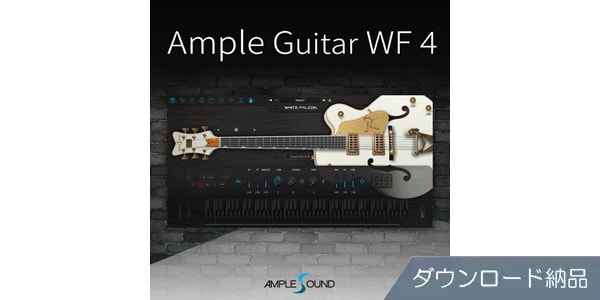


This electric guitar sound module lets you play the Gretsch White Falcon with simple controls. Available for download.
■ Software Sound Source
■ Guitar Sound Source (Gretsch Vintage 1959 White Falcon Model)
---------------
■ Download Delivery
- Approximately 10 minutes after completing your purchase, an activation code will be delivered to your registered email address.
- Activate the code you received on the D2R page below and you will receive product installation information via email. (You can also view the information by clicking the email icon on the D2R page.)
D2R Page
*If you do not have a D2R Page account, please register by clicking ""Register Here"" on the D2R Page.
- You can also view your D2R registration activation code by clicking ""Order Details"" in your Sound House My Page or Purchase History.
*It may take a few minutes for the information to be reflected in your purchase history.
・Click ""Support Information"" under ""Order Details"" to view activation information.
・For detailed installation and usage instructions, please contact the manufacturer.
---------------
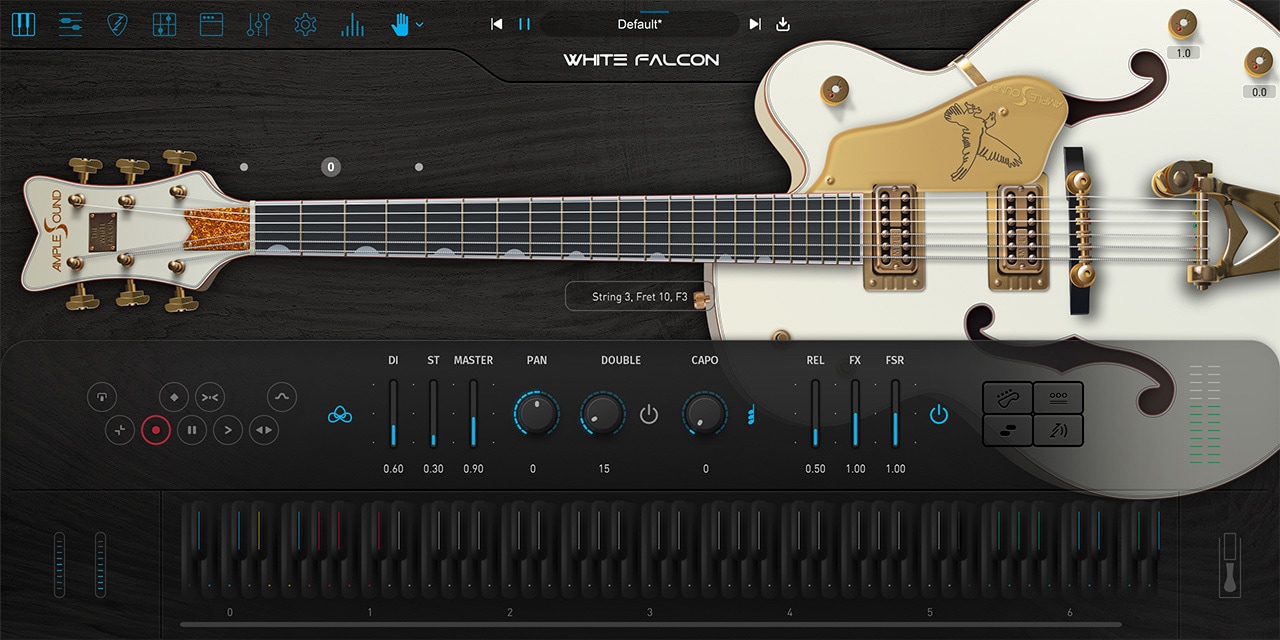
""AMPLE GUITAR WF 4"" lets you freely play the hollow-body Gretsch Vintage 1959 White Falcon guitar on your computer, perfect for jazz, blues, and '60s-'70s rock sounds. Picked and fingered sounds were meticulously sampled from frets 0 through 22 on each string. All the necessary articulations, including sustain, natural harmonics, palm mute, slide, and hammer-on/pull-off, are recorded with a dry, natural sound without reverberation. Randomized pick attack and sustain ratios, as well as automatically inserted fret noise and release noise, allow for lively performances.
The ""Strummer"" mode lets you play chords, allowing you to register up to eight rhythm patterns and incorporate arpeggios and strumming. Rhythm patterns can be switched in real time with a key switch. Of course, you can also freely control chords with up/down strokes, mutes, and picking specific strings using key switches. The built-in amp system allows you to freely select and combine multiple amp heads, cabinets, and microphones to create your own sounds.
The ""Riffer 4"" function for creating guitar riffs lets you edit riffs while visualizing which notes are played on which strings in the piano roll. It also features a DAW-like MIDI CC and velocity editor. You can even specify chords and keys to transpose notes together. The ""Strum Note"" function makes strumming more intuitive and efficient, allowing you to treat multiple notes that make up a chord in a riff as a single object, providing central control over strum timing, velocity changes, legato, and other parameters.
Other features include a ""Tab Player Panel"" that loads and plays tablature created with v3 - v8 of the tablature and score editing software ""Guitar Pro,"" an 8-band EQ, a compressor with selectable RMS and Peak, a 6-Tap Echo, and an IR Reverb, making it an evolved guitar sound source that is visually easy to understand and use.
■Main Features
- Riffer 4 function for creating guitar riffs
- Tab Reader 4 can read and play Guitar Pro format ("".gp3"", "".gp4"", "".gp5"", "".gpx"") files (tab editing is not possible on AMPLE GUITAR)
- 5K-compatible high-resolution UI
- Clean, unamplified tone
- 24-bit/44.1 kHz sampling
- Optimize library capacity by adjusting velocity layer and round-robin sample count for each fret based on expected frequency of use
- Articulation switching via key switches
- Includes various sounds, such as fret noise and release noise, to add realism to your performance
- Capo function transposes performance sounds while retaining key switches and input notes
- Capo Logic function automatically selects optimal fret/position (manual selection of fret positions/strings to use for performance is also possible)
- Alternate tuning for downtuning each string Tuner (supports up to one note down)
- ""OPEN STRING FIRST"" function prioritizes open strings in phrases played in high positions
- Doubling effect simulates the sound of two guitars layered on top of each other
- When running standalone, MIDI input is possible using the computer's keyboard as a virtual keyboard.
- Ability to adjust attack time and start time, which occurs between the time your finger or pick hits the string and the time it is plucked and sounds.
- New UI design using GPU acceleration.
*Please be sure to check the operating environment information at the bottom of the distributor's website.
*Please also check the distributor's page above for details on product contents.
■ Guitar Sound Source (Gretsch Vintage 1959 White Falcon Model)
---------------
■ Download Delivery
- Approximately 10 minutes after completing your purchase, an activation code will be delivered to your registered email address.
- Activate the code you received on the D2R page below and you will receive product installation information via email. (You can also view the information by clicking the email icon on the D2R page.)
D2R Page
*If you do not have a D2R Page account, please register by clicking ""Register Here"" on the D2R Page.
- You can also view your D2R registration activation code by clicking ""Order Details"" in your Sound House My Page or Purchase History.
*It may take a few minutes for the information to be reflected in your purchase history.
・Click ""Support Information"" under ""Order Details"" to view activation information.
・For detailed installation and usage instructions, please contact the manufacturer.
---------------
""AMPLE GUITAR WF 4"" lets you freely play the hollow-body Gretsch Vintage 1959 White Falcon guitar on your computer, perfect for jazz, blues, and '60s-'70s rock sounds. Picked and fingered sounds were meticulously sampled from frets 0 through 22 on each string. All the necessary articulations, including sustain, natural harmonics, palm mute, slide, and hammer-on/pull-off, are recorded with a dry, natural sound without reverberation. Randomized pick attack and sustain ratios, as well as automatically inserted fret noise and release noise, allow for lively performances.
The ""Strummer"" mode lets you play chords, allowing you to register up to eight rhythm patterns and incorporate arpeggios and strumming. Rhythm patterns can be switched in real time with a key switch. Of course, you can also freely control chords with up/down strokes, mutes, and picking specific strings using key switches. The built-in amp system allows you to freely select and combine multiple amp heads, cabinets, and microphones to create your own sounds.
The ""Riffer 4"" function for creating guitar riffs lets you edit riffs while visualizing which notes are played on which strings in the piano roll. It also features a DAW-like MIDI CC and velocity editor. You can even specify chords and keys to transpose notes together. The ""Strum Note"" function makes strumming more intuitive and efficient, allowing you to treat multiple notes that make up a chord in a riff as a single object, providing central control over strum timing, velocity changes, legato, and other parameters.
Other features include a ""Tab Player Panel"" that loads and plays tablature created with v3 - v8 of the tablature and score editing software ""Guitar Pro,"" an 8-band EQ, a compressor with selectable RMS and Peak, a 6-Tap Echo, and an IR Reverb, making it an evolved guitar sound source that is visually easy to understand and use.
■Main Features
- Riffer 4 function for creating guitar riffs
- Tab Reader 4 can read and play Guitar Pro format ("".gp3"", "".gp4"", "".gp5"", "".gpx"") files (tab editing is not possible on AMPLE GUITAR)
- 5K-compatible high-resolution UI
- Clean, unamplified tone
- 24-bit/44.1 kHz sampling
- Optimize library capacity by adjusting velocity layer and round-robin sample count for each fret based on expected frequency of use
- Articulation switching via key switches
- Includes various sounds, such as fret noise and release noise, to add realism to your performance
- Capo function transposes performance sounds while retaining key switches and input notes
- Capo Logic function automatically selects optimal fret/position (manual selection of fret positions/strings to use for performance is also possible)
- Alternate tuning for downtuning each string Tuner (supports up to one note down)
- ""OPEN STRING FIRST"" function prioritizes open strings in phrases played in high positions
- Doubling effect simulates the sound of two guitars layered on top of each other
- When running standalone, MIDI input is possible using the computer's keyboard as a virtual keyboard.
- Ability to adjust attack time and start time, which occurs between the time your finger or pick hits the string and the time it is plucked and sounds.
- New UI design using GPU acceleration.
*Please be sure to check the operating environment information at the bottom of the distributor's website.
*Please also check the distributor's page above for details on product contents.
商品レビューProduct Review




不適切な投稿として報告しますか?
理由
ご協力ありがとうございました
投稿を削除しますか?
投稿されたレビューを削除しました。
AMPLE SOUND
AMPLE GUITAR WF 4 download delivery
Item ID:380587
20,548 yen(incl. tax)

205Pt(1%)Detail
- 205Pts
通常ポイント
- 205Pts
Total
 Download
 Only the serial number will be sent to your registered email address. Orders cannot be changed or cancelled after they have been placed by the customer.
- In Stock
- In Stock, can be shipped when order is confirmed.
- Low Stock
- Low Stock, may be sold out soon.
- Scheduled date
- Expected to arrive at Sound House on this date.
- TBA
- Expected date of arrival at Sound House to be determined.
- Back Order
- It needs to be orderd from the manufacturer. Please inquire about the estimated date of arrival.
- Mfr. Delivery
- Must be ordered from manufacturer. Please inquire about the estimated date of arrival.
- Download
- Only the serial number will be sent to your registered email address.
- Special Order
- Made to order item or must be ordered from manufacturer. May take several weeks or months.
- No Longer Available
- Product is no longer available due to having been discoutined or other reasons.
Rating


この商品に関連するセレクションRelated Articles



-
 Discount Sale
-
 Outlet
-
 New Arrivals
-
 Podcast (streaming)
-
 Headphones / Earphones
-
 Microphones
-
 Wireless Equipment
-
 Speakers
-
 Power Amps
-
 Mixers
-
 Processors
-
 Portable PA Systems
-
 Recorders
-
 Karaoke
-
 Guitars
-
 Basses
-
 Ukuleles
-
 Drums & Percussion
-
 Pianos / Synthesizers
-
 Wind Instruments
-
 Stringed Instruments
-
 Japanese Instruments
-
 Harmonicas, Other
-
 Software
-
 DJ & VJ
-
 Stands
-
 Cables & Connectors
-
 Racks & Cases
-
 Lighting
-
 Stage & Truss
-
 Video Equipment
-
 PC PERIPHERALS
-
 Power Supplies
-
 Studio Furniture
-
 Household Items, Other
-
 Alcoholic Beverages
Search by Brand
Brand List








- Sound House
- 〒286-0825 14-3 Shinizumi , Narita City, Chiba
- Monday-Friday 10:00-17:00
- Narita Call Center
- TEL. 0476-89-1111
- FAX. 0476-89-2222
- Tokushima Call Center
- TEL. 0885-38-1111
- FAX. 0885-38-1100
- Showroom Hours
- Monday-Friday 10:00-17:00
closed on Saturdays, Sundays and Holidays


© Sound House

すべてのレビューを見る