


- Mixers
- Mixer Accessories
- Accessories
- CLASSIC PRO/CBR2 Bluetooth receiver
CLASSIC PRO / CBR2 Bluetooth receiver


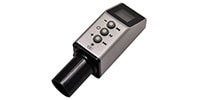
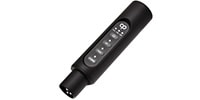
■Mono/Stereo/TWS Mode Supported
The CBR2 easily enables Bluetooth audio playback by simply connecting it to the XLR microphone input terminal of a mixer or powered speaker. In addition to switching between stereo and mono modes with a single unit, two units can be used for TWS (True Wireless Stereo) stereo playback. Furthermore, it has a built-in rechargeable lithium battery, providing up to 8 hours of continuous playback on a single charge of approximately 2 hours. This highly versatile Bluetooth receiver is ideal for a wide range of uses, including speeches, lessons, and band practice.
■MONO Mode
The left and right channels of the stereo signal are mixed into mono.
■STEREO Mode
The left channel is output from the lower XLR, and the right channel is output from the upper XLR.
■TWS Mode
Two CBR2 units are required. The left channel is output from the first CBR2, and the right channel is output from the second CBR2.
■Features
Adds Bluetooth audio playback functionality to powered speakers and mixers.
Features an XLR output on the top for wired stereo playback.
Two CBR2s are provided for wireless stereo playback in TWS mode.
Equipped with a battery that can be charged via USB Type-C.
Features buttons for power on/off, TWS link, Bluetooth pairing, and stereo/mono switching.
LEDs indicate battery charge and operating status.
Durable ABS housing.
■Specifications
Output (top/bottom): XLR male, balanced
Output level: +6dBu (max)
Battery playback time: Approximately 8 hours
Battery charging time: Approximately 2 hours
S/N ratio: 95dB
Input voltage: DC5V/300mA
Frequency range: 20-20000Hz
Built-in battery: 3.7V/500mAh 1.83Wh
Bluetooth communication range: Up to 30m
Bluetooth profiles: Bluetooth 5.3, A2DP, AVRCP
Supported Codecs: SBC, AAC
Bluetooth Frequency Band: 2.402-2.480GHz
Weight: 51g
Dimensions (Diameter x Height): 27 x 115 mm
Operating Ambient Temperature: 0-40℃
■Part Names
LOW (Red): Flashes when the built-in battery power is low.
CHG (Orange): Lights up during charging and turns off when charging is complete.
FULL (Red): Lights up when charging is complete and automatically stops charging.
Power Button: Press and hold the button for 3 seconds or more to turn the device ON or OFF.
Pairing Button (BT): Press and hold the button for 3 seconds or more to pair with a smartphone, tablet, laptop PC, etc.
TWS Button: Links two ""CBR2"" speakers for audio playback from two speakers (TWS mode).
STEREO Button: Switches between stereo and mono modes.
*In stereo mode, the LED is always lit, and the left channel signal is output from the lower XLR terminal, while the right channel signal is output from the upper XLR output. In mono mode, the LED is off, and the left and right channels of the stereo signal are mixed into mono and output from the lower XLR terminal.
■Pairing Method
1. Turn on the CBR2.
2. Press and hold the pairing button for more than 3 seconds to enter ""pairing mode"" to search for Bluetooth devices, and the blue LED will blink.
3. Select ""CBR2"" displayed on the settings screen of the transmitting Bluetooth device (smartphone, etc.) and connect.
4. Upon successful pairing, a confirmation sound will play, and the blue LED will change from blinking to solid.
■TWS Mode Pairing Method
1. Prepare two CBR2s and connect each to a speaker, etc.
2. Press the pairing button on the first CBR2 to pair with the audio device.
3. Turn on the second CBR2. 4. Press and hold the ""TWS button"" on both CBR2s simultaneously. The green LED will change from blinking to solid, indicating that the two CBR2s are connected. The first CBR2 outputs the left channel, and the second CBR2 outputs the right channel.
The maximum output level of the CBR2s is +6 dBu. For example, if you have your smartphone's volume at maximum, it will output a signal equivalent to line level.
If you connect this to a mixer's microphone input and increase the gain (GAIN) as you would a microphone, it may cause distortion or excessive input.
Please take one of the following actions:
If your mixer has a PAD switch:
→ Turn the PAD ON (this will appropriately attenuate the signal input level).
If your mixer does not have a PAD:
→ Adjust the GAIN knob from the minimum (zero) setting.
→ Also, lower the volume on your smartphone or other connected device to ensure clear sound.
関連商品
-
¥2,580(incl. tax)
 In Stock
 SH / 音家 T-shirt, M
スタッフレビュー
好評販売中のBluetoothレシーバー「CBR1」の兄弟モデルとしてラインナップに加わった「CBR2」は、多くのご要望にお応えし、ステレオ出力に対応しました!本体は軽量かつコンパクトで、機材ケースにとりあえず1つ入れておくのがおすすめです。もちろん、モノラル出力での単体使用も可能です。さらに、CBR2はTWS(True Wireless Stereo)モードにも対応。バッテリー内蔵のパワードスピーカー2台と組み合わせれば、完全ワイヤレスPAシステムが完成します。BGM再生が必要な音楽イベントやレッスン、学校行事などいろいろな用途で大活躍間違いなしの便利アイテムです。
 営業部 / 河西 政佳
商品レビューProduct Review
2026/03/20
 お手軽BGM
投稿者名Reviewed by:ちょいと裏方。 【宮崎県】
軽い感じのイベントBGMならこれでじゅうぶん、、なにせお手軽。タブレットアプリからスイスイBGM再生。抽選会のピンポン効果音なんぞ出してあげたもんなら、「さすがーーー」と、拍手もらえます。ぱっと見、変換プラグほどの大きさにヨク仕込んだモンです。上下のアウト穴でモノ・ステレオ再生も気が利きまくりアイテムです。で、安い〜👍️
レビューIDReview ID:69bc2cc28f98ce007a00001f

2025/10/20
簡単・安価・十分
投稿者名Reviewed by:キムデカ 【石川県】
某秋祭りで携帯からのオリジナル曲をYAMAHAの古いミキサー(MG166CX-USB)に接続して流しました。屋外500人規模でしたが簡単・安価・BGM用でしたので音も満足いくレベルですわ!
レビューIDReview ID:68f58343cc0e940058000016
2025/06/04
コスパ最高
投稿者名Reviewed by:ショーチャン 【福岡県】
Bluetoothなので遅延があるかなと思ってたのですが全く感じられません。この値段ではベストかなと思います。スマホからmixerに飛ばして弾き語りには便利です。bossのstreet2アコギアンプをつかっけるのですがアンプからmixerに飛ばすBluetooth発信機があればいいなと思ってます。
レビューIDReview ID:683fc00d0f7472006d00001c
2026/10/02 
これはいい
投稿者名Reviewed by:武じい 【香川県】
ちょい便利です。音質、遅れなど問題ないですね。そもそもそれなりに使えば。
ただ、ファンタム使用中はすこし注意が!!相性よくないかもです。
以前購入したCBR1は二回壊れました。原因はわかりません。でも持っていれば助かります。
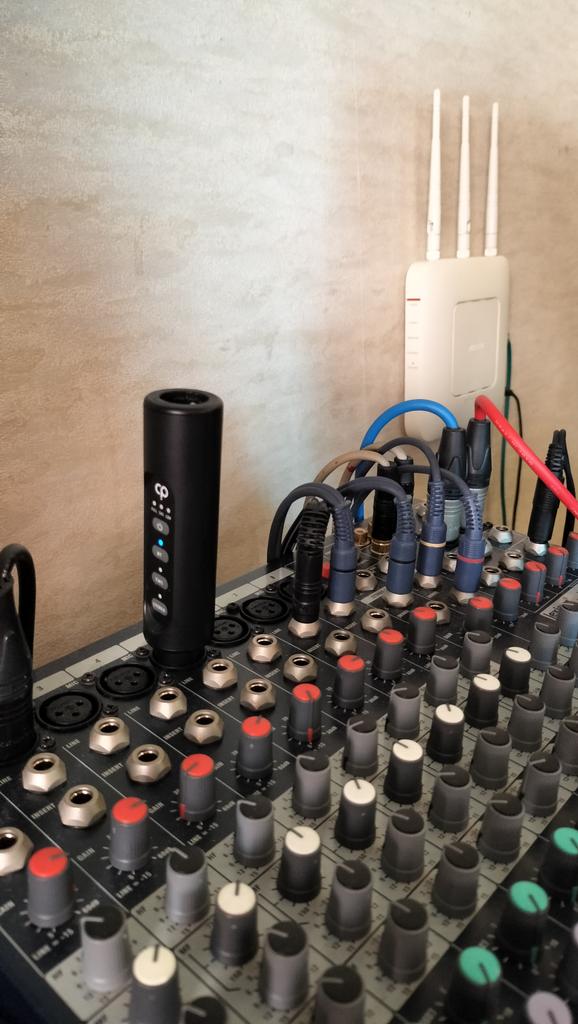
ミキサーに刺した状態で操作面が横向きになり不便です。目視しずらい。
レビューIDReview ID:6abf07c38b73a6007a00000e
2025/10/26
USBの接触が甘い
投稿者名Reviewed by:かずやさん 【大阪府】
音源ソースとの接続も簡単ですし、安価で良いです。
パワードミキサーに繋いで使っています。
USB-Cで充電するのですが、接触が甘くちょっと気を使います。
たまにしか使わないので良いのですが。
なので★4つとしました。
レビューIDReview ID:68fd7de7c449d90065000023




不適切な投稿として報告しますか?
理由
ご協力ありがとうございました
投稿を削除しますか?
投稿されたレビューを削除しました。


CLASSIC PRO
CBR2 Bluetooth receiver
Item ID:355126
4,980 yen(incl. tax)

248Pt(5%)Detail
- 49Pts
通常ポイント
- 199Pts
ポイント5倍キャンペーン
- 248Pts
Total
- In Stock
- In Stock, can be shipped when order is confirmed.
- Low Stock
- Low Stock, may be sold out soon.
- Scheduled date
- Expected to arrive at Sound House on this date.
- TBA
- Expected date of arrival at Sound House to be determined.
- Back Order
- It needs to be orderd from the manufacturer. Please inquire about the estimated date of arrival.
- Mfr. Delivery
- Must be ordered from manufacturer. Please inquire about the estimated date of arrival.
- Download
- Only the serial number will be sent to your registered email address.
- Special Order
- Made to order item or must be ordered from manufacturer. May take several weeks or months.
- No Longer Available
- Product is no longer available due to having been discoutined or other reasons.
Rating



この商品に関連するセレクションRelated Articles
-
 Discount Sale
-
 Outlet
-
 New Arrivals
-
 Podcast (streaming)
-
 Headphones / Earphones
-
 Microphones
-
 Wireless Equipment
-
 Speakers
-
 Power Amps
-
 Mixers
-
 Processors
-
 Portable PA Systems
-
 Recorders
-
 Karaoke
-
 Guitars
-
 Basses
-
 Ukuleles
-
 Drums & Percussion
-
 Pianos / Synthesizers
-
 Wind Instruments
-
 Stringed Instruments
-
 Japanese Instruments
-
 Harmonicas, Other
-
 Software
-
 DJ & VJ
-
 Stands
-
 Cables & Connectors
-
 Racks & Cases
-
 Lighting
-
 Stage & Truss
-
 Video Equipment
-
 PC PERIPHERALS
-
 Power Supplies
-
 Studio Furniture
-
 Household Items, Other
-
 Alcoholic Beverages
Search by Brand
Brand List








- Sound House
- 〒286-0825 14-3 Shinizumi , Narita City, Chiba
- Monday-Friday 10:00-17:00
- Narita Call Center
- TEL. 0476-89-1111
- FAX. 0476-89-2222
- Tokushima Call Center
- TEL. 0885-38-1111
- FAX. 0885-38-1100
- Showroom Hours
- Monday-Friday 10:00-17:00
closed on Saturdays, Sundays and Holidays


© Sound House

すべてのレビューを見る