


- Software
- Plug-in/Software
- UAD plug-ins
- UNIVERSAL AUDIO/Capitol Chambers Download Delivery
UNIVERSAL AUDIO / Capitol Chambers Download Delivery
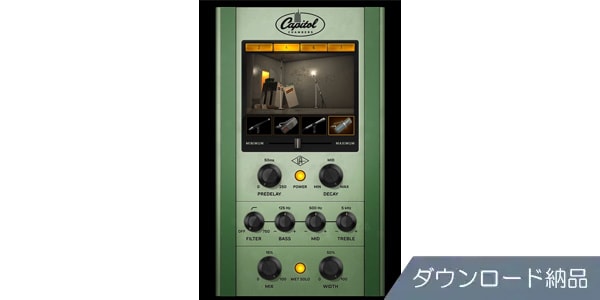
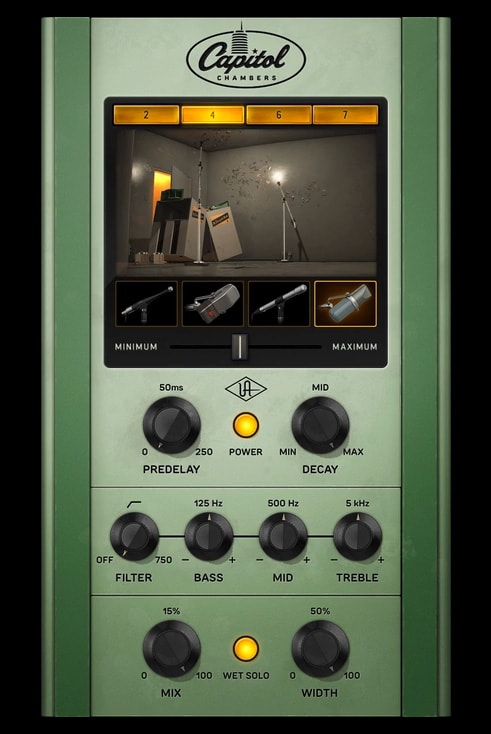


Mix and master processing with a sweet, transparent quality achieved through tube recording. Delivered as a download.
■UAD Plugin
==========================
■Download Delivery
・Approximately 10 minutes after completing your purchase, only the activation code will be delivered to your registered email address.
・By activating the received code on the D2R page below, you will receive product installation information via email. (Information can also be displayed by clicking the email icon on the D2R page)
D2R Page
*If you do not have a D2R page account, please register as a user from ""Register Here"" on the D2R page.
・You can also check the activation code for D2R registration by clicking ""Order Details"" in your purchase history on your Sound House My Page.
*It may take a few minutes for the information to be reflected in your purchase history.
* Clicking ""Support Information"" in ""Order Details"" will display activation information.
* For detailed installation/usage instructions, please contact the manufacturer.
=========================
From Ray Charles to Frank Sinatra, from Beck to Muse, the basement space of Los Angeles' iconic Capitol Tower has provided an unparalleled, gorgeous Hi-Fi ambience for decades. Through years of research and development and close collaboration with Capitol Studios, Universal Audio proudly presents the Capitol Chambers plugin.
■Features
- The world's only authentic plugin emulation that recreates the underground echo chamber of Capitol Studios, adding rich, natural reverb to vocals and drums during recording and mixing, far surpassing plate, digital, and simple convolution reverb.
- Utilize UA's dynamic room modeling to create new sounds by changing the microphone placement of Capitol Chambers.
- Audition entirely new settings in addition to current and historical chamber configurations.
- Utilize the entire chamber signal chain, including amplifiers, speakers, custom preamps, and microphones.
- Quickly recall presets created by Grammy Award-winning engineers who have worked with Ray Charles, Radiohead, Steely Dan, Madonna, and other artists.
■Operating Environment
This product operates on UAD Native or Apollo interfaces and UAD-2 hardware. For the operating environment of UAD Native plugins, please refer to the manufacturer's website product page at .
■Manufacturer Support
For inquiries regarding UAD plugins, please contact the manufacturer's distributor support page at . Installation guides and detailed operating environment information are also available there, so please make use of it.
商品レビューProduct Review




不適切な投稿として報告しますか?
理由
ご協力ありがとうございました
投稿を削除しますか?
投稿されたレビューを削除しました。
UNIVERSAL AUDIO
Capitol Chambers Download Delivery
Item ID:360975
Regular Price:¥32,835(incl. tax)
¥24,585(incl. tax)

限定特価
 Download
Only the serial number will be sent to your registered email address. Orders cannot be changed or cancelled after they have been placed by the customer.
- In Stock
- In Stock, can be shipped when order is confirmed.
- Low Stock
- Low Stock, may be sold out soon.
- Scheduled date
- Expected to arrive at Sound House on this date.
- TBA
- Expected date of arrival at Sound House to be determined.
- Back Order
- It needs to be orderd from the manufacturer. Please inquire about the estimated date of arrival.
- Mfr. Delivery
- Must be ordered from manufacturer. Please inquire about the estimated date of arrival.
- Download
- Only the serial number will be sent to your registered email address.
- Special Order
- Made to order item or must be ordered from manufacturer. May take several weeks or months.
- No Longer Available
- Product is no longer available due to having been discoutined or other reasons.
Rating


この商品に関連するセレクションRelated Articles

-
 Discount Sale
-
 Outlet
-
 New Arrivals
-
 Podcast (streaming)
-
 Headphones / Earphones
-
 Microphones
-
 Wireless Equipment
-
 Speakers
-
 Power Amps
-
 Mixers
-
 Processors
-
 Portable PA Systems
-
 Recorders
-
 Karaoke
-
 Guitars
-
 Basses
-
 Ukuleles
-
 Drums & Percussion
-
 Pianos / Synthesizers
-
 Wind Instruments
-
 Stringed Instruments
-
 Japanese Instruments
-
 Harmonicas, Other
-
 Software
-
 DJ & VJ
-
 Stands
-
 Cables & Connectors
-
 Racks & Cases
-
 Lighting
-
 Stage & Truss
-
 Video Equipment
-
 PC PERIPHERALS
-
 Power Supplies
-
 Studio Furniture
-
 Household Items, Other
-
 Alcoholic Beverages
Search by Brand
Brand List






- Sound House
- 〒286-0825 14-3 Shinizumi , Narita City, Chiba
- Monday-Friday 10:00-17:00
- Narita Call Center
- TEL. 0476-89-1111
- FAX. 0476-89-2222
- Tokushima Call Center
- TEL. 0885-38-1111
- FAX. 0885-38-1100
- Showroom Hours
- Monday-Friday 10:00-17:00
closed on Saturdays, Sundays and Holidays


© Sound House

すべてのレビューを見る