


SHURE / HUBX1
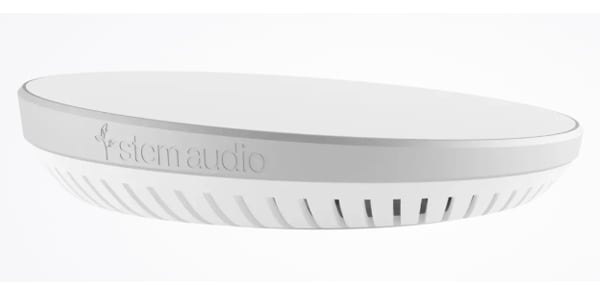
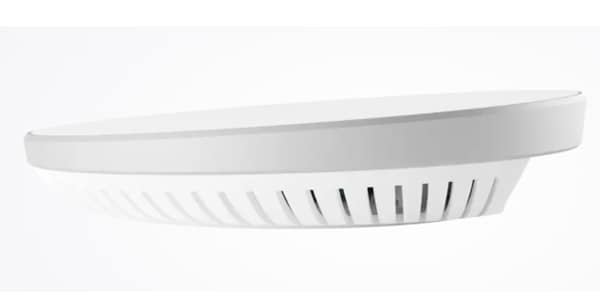


A device hub is used when there are multiple Stem devices in a room or when you want to connect external devices. It integrates multiple audio devices and allows them to function together as a single conference sound system.

~The brain that controls operations.~
■Integrated audio as a central management device
Processes audio signals from all Stem devices to unify audio channels throughout the room. Functions as an interface for connecting to online meeting platforms.
■Flexible connectivity
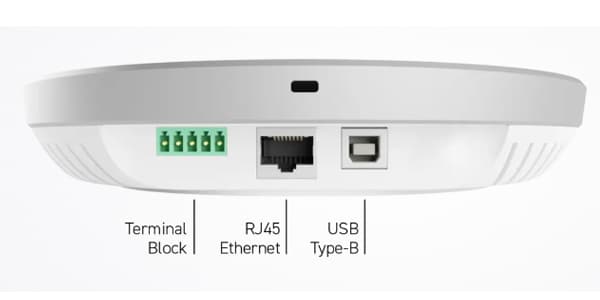
Ethernet connectivity provides data, SIP, and communication capabilities between Stem endpoints to each device. A USB port is also included for direct connection to online meeting PCs. Terminal block connectors are available for existing speakers or for adding speaker outputs.
■Effortless installation
Network connection is achieved with a single Ethernet cable. PoE+ support allows for simultaneous power supply. Free yourself from cumbersome wiring work, making installation and operation easy and smart.
・Mounting
Can be installed discreetly on walls, behind displays, or inside cabinets.
? Connectors
Ethernet: For power (PoE+) supply and data communication
USB Type B: For PC connection
Terminal Block: For external speaker connection
■What is Stem Ecosystem?
The Stem Ecosystem is a powerful platform that allows you to easily and comfortably perform everything from device selection and setup to adjustment and verification without the need for a specialized engineer. Each device in the Stem Ecosystem can be operated via Stem Control, the iOS or Android app, or a web browser. The following functions are available for device selection, automatic adjustment, sound quality management during operation, and remote operation checks:
? RoomDesign
It almost faithfully reproduces the meeting space, allowing you to accurately determine the necessary devices and quantities before purchase. You can select the combination of devices as needed, place them in the desired location, and check the sound pickup range.
? RoomAdapt
No manual setup or adjustment is required. Simply press a button, and the Stem device will play a signal tone, automatically making the necessary settings according to the room's acoustic characteristics, and adjusting and optimizing the device's sound quality.
* RoomCheck
This feature analyzes the recorded speaker's voice, room noise, and reverberation resulting from the room's acoustic characteristics, creating a heatmap and displaying the predicted sound quality for each area of ??the room.
* Remote Management
This tool allows you to remotely monitor the operating status of the Stem Ecosystem. You can check and operate everything from conference room usage and device logs to system usage and automatic firmware update scheduling from any network terminal, anytime, anywhere.
* When building a system with two or more STEM devices, a STEM HUB is required for each conference room configuration.
* VLAN Connection: When connecting Stem devices to the network, a wired connection within the same VLAN is required.
* PoE+ Compatible Network: Power is supplied to the equipment simultaneously via the Ethernet cable that transmits audio/control signals. Please ensure you have a PoE+ compatible network.
* Bandwidth: A bandwidth of 2 Mbps per device is required for using Stem devices in conferences.
* A conference environment cannot be built using only the STEM HUB or STEM CONTORL. You will need a microphone and speaker, such as a STEM TABLE or STEM WALL.
■Integrated audio as a central management device
Processes audio signals from all Stem devices to unify audio channels throughout the room. Functions as an interface for connecting to online meeting platforms.
■Flexible connectivity
Ethernet connectivity provides data, SIP, and communication capabilities between Stem endpoints to each device. A USB port is also included for direct connection to online meeting PCs. Terminal block connectors are available for existing speakers or for adding speaker outputs.
■Effortless installation
Network connection is achieved with a single Ethernet cable. PoE+ support allows for simultaneous power supply. Free yourself from cumbersome wiring work, making installation and operation easy and smart.
・Mounting
Can be installed discreetly on walls, behind displays, or inside cabinets.
? Connectors
Ethernet: For power (PoE+) supply and data communication
USB Type B: For PC connection
Terminal Block: For external speaker connection
■What is Stem Ecosystem?
The Stem Ecosystem is a powerful platform that allows you to easily and comfortably perform everything from device selection and setup to adjustment and verification without the need for a specialized engineer. Each device in the Stem Ecosystem can be operated via Stem Control, the iOS or Android app, or a web browser. The following functions are available for device selection, automatic adjustment, sound quality management during operation, and remote operation checks:
? RoomDesign
It almost faithfully reproduces the meeting space, allowing you to accurately determine the necessary devices and quantities before purchase. You can select the combination of devices as needed, place them in the desired location, and check the sound pickup range.
? RoomAdapt
No manual setup or adjustment is required. Simply press a button, and the Stem device will play a signal tone, automatically making the necessary settings according to the room's acoustic characteristics, and adjusting and optimizing the device's sound quality.
* RoomCheck
This feature analyzes the recorded speaker's voice, room noise, and reverberation resulting from the room's acoustic characteristics, creating a heatmap and displaying the predicted sound quality for each area of ??the room.
* Remote Management
This tool allows you to remotely monitor the operating status of the Stem Ecosystem. You can check and operate everything from conference room usage and device logs to system usage and automatic firmware update scheduling from any network terminal, anytime, anywhere.
* When building a system with two or more STEM devices, a STEM HUB is required for each conference room configuration.
* VLAN Connection: When connecting Stem devices to the network, a wired connection within the same VLAN is required.
* PoE+ Compatible Network: Power is supplied to the equipment simultaneously via the Ethernet cable that transmits audio/control signals. Please ensure you have a PoE+ compatible network.
* Bandwidth: A bandwidth of 2 Mbps per device is required for using Stem devices in conferences.
* A conference environment cannot be built using only the STEM HUB or STEM CONTORL. You will need a microphone and speaker, such as a STEM TABLE or STEM WALL.

サウンドハウスはShure製品の正規販売店です。
当店でご購入いただいたShure製品には、メーカー保証が適用されます。
商品レビューProduct Review




不適切な投稿として報告しますか?
理由
ご協力ありがとうございました
投稿を削除しますか?
投稿されたレビューを削除しました。
SHURE
HUBX1
Item ID:325462
71,500 yen(incl. tax)

715Pt(1%)Detail
- 715Pts
通常ポイント
- 715Pts
Total
 Special Order
 - In Stock
- In Stock, can be shipped when order is confirmed.
- Low Stock
- Low Stock, may be sold out soon.
- Scheduled date
- Expected to arrive at Sound House on this date.
- TBA
- Expected date of arrival at Sound House to be determined.
- Back Order
- It needs to be orderd from the manufacturer. Please inquire about the estimated date of arrival.
- Mfr. Delivery
- Must be ordered from manufacturer. Please inquire about the estimated date of arrival.
- Download
- Only the serial number will be sent to your registered email address.
- Special Order
- Made to order item or must be ordered from manufacturer. May take several weeks or months.
- No Longer Available
- Product is no longer available due to having been discoutined or other reasons.
Rating


この商品に関連するセレクションRelated Articles

-
 Discount Sale
-
 Outlet
-
 New Arrivals
-
 Podcast (streaming)
-
 Headphones / Earphones
-
 Microphones
-
 Wireless Equipment
-
 Speakers
-
 Power Amps
-
 Mixers
-
 Processors
-
 Portable PA Systems
-
 Recorders
-
 Karaoke
-
 Guitars
-
 Basses
-
 Ukuleles
-
 Drums & Percussion
-
 Pianos / Synthesizers
-
 Wind Instruments
-
 Stringed Instruments
-
 Japanese Instruments
-
 Harmonicas, Other
-
 Software
-
 DJ & VJ
-
 Stands
-
 Cables & Connectors
-
 Racks & Cases
-
 Lighting
-
 Stage & Truss
-
 Video Equipment
-
 PC PERIPHERALS
-
 Power Supplies
-
 Studio Furniture
-
 Household Items, Other
-
 Alcoholic Beverages
Search by Brand
Brand List








- Sound House
- 〒286-0825 14-3 Shinizumi , Narita City, Chiba
- Monday-Friday 10:00-17:00
- Narita Call Center
- TEL. 0476-89-1111
- FAX. 0476-89-2222
- Tokushima Call Center
- TEL. 0885-38-1111
- FAX. 0885-38-1100
- Showroom Hours
- Monday-Friday 10:00-17:00
closed on Saturdays, Sundays and Holidays


© Sound House

すべてのレビューを見る